

Make AI behavior clear and recoverable
Generated setup and interface review that clarify what the system can do, what people need to verify, and how they recover when it fails.
I build design teams for complex software, and help them make AI useful in the product and in the way they work.
Generated setup and interface review that clarify what the system can do, what people need to verify, and how they recover when it fails.
Built shared career ladders and coaching practices, and clarified ownership between product and design at Shortcut.
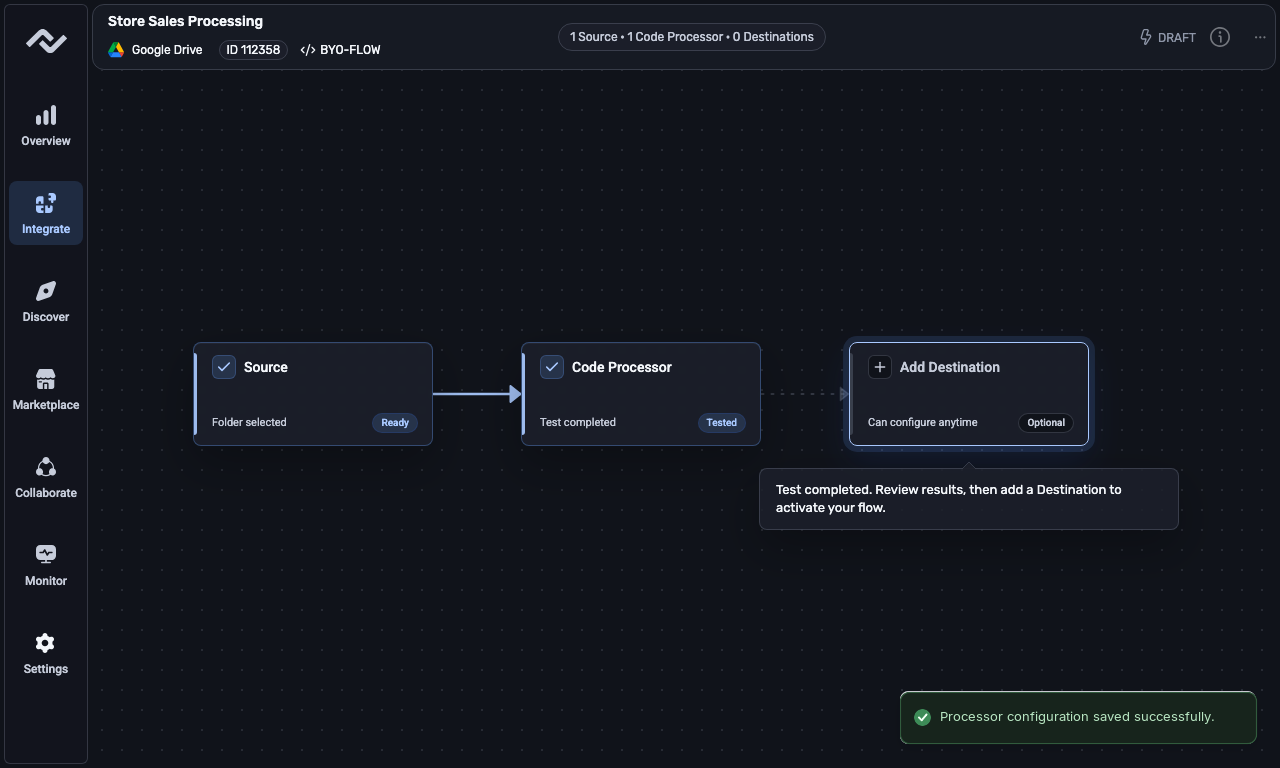
Custom code and schema setup work focused on visible state, testable steps, and clearer engineering handoffs.
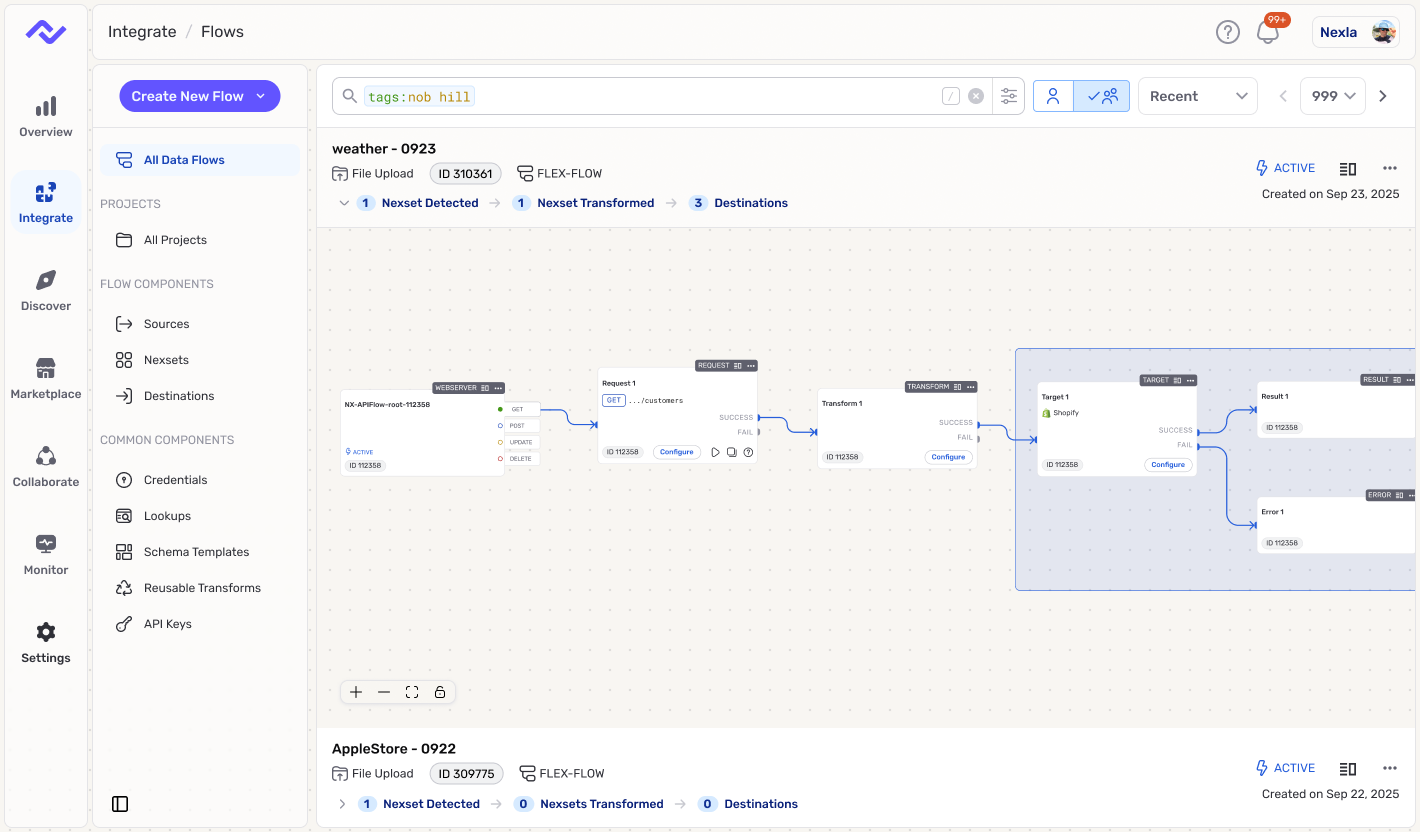
Dashboard and flow setup changes where the work was tighter structure, clearer defaults, and visible next steps.
Local memory, reusable skills, and visible usage limits help teams inspect and repeat their work with AI agents.
Portfolio Overview
Design leadership for platform products where users need clear state and teams need reusable ways to ship.
The portfolio focuses on products where connector setup, schema import, file testing, and credential retry can fail in expensive ways. The work usually starts the same way: map the real path, name the risky transition, and make the product or team artifact explicit enough for other people to use.
The cases cover data pipelines, generated setup, career ladders, calibration, and agent workflow systems. Unclear product status often points to unclear team expectations behind it: fuzzy ownership, uneven review, or choices that are hard to repeat. The strongest work tightened both the user-facing surface and the way the team shipped it.
My experience spans data engineering at Nexla, Cloud Foundry at Pivotal, CI/CD and project management at GitLab, and collaboration at Shortcut. Across those products, I have worked on how people understand a system, make decisions, and recover when something goes wrong.
At DevClarity, I train product managers, designers, and software teams to use AI across discovery, prototyping, and engineering handoff. I develop reusable workflows that connect product intent, customer evidence, and clear responsibilities across Product, Design, Engineering, and QA.
At Pivotal, I helped grow the Cloud Foundry R&D design organization from two to more than 20 designers, while managing and developing six designers across platform teams. Building teams and shared practices remains part of how I make complex product behavior easier to design and review.
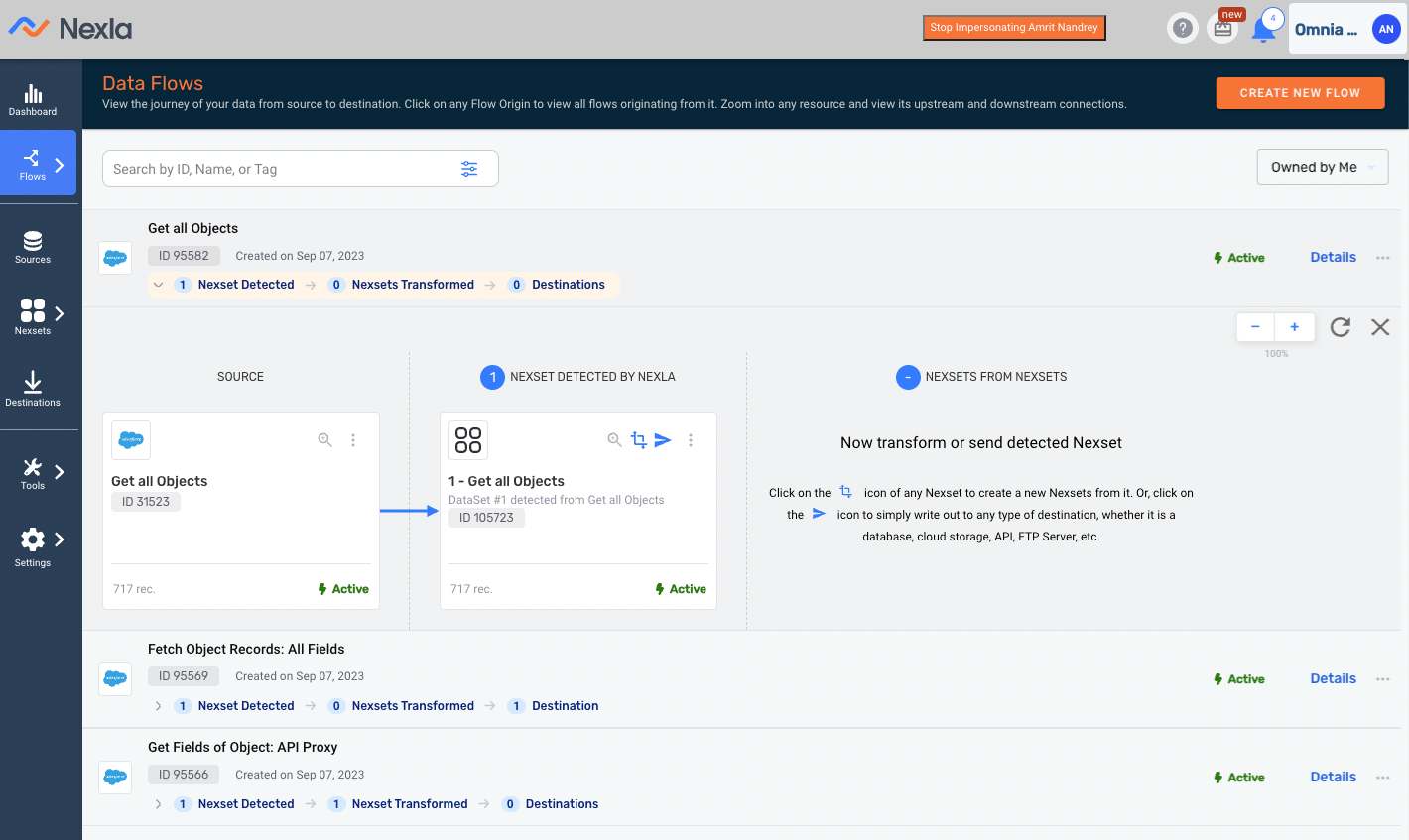
At Nexla, I joined as the first full-time designer and partnered directly with the CEO and product leadership. The 50+ surfaces covered connector setup, schema work, flow creation, dashboards, reporting, Express.dev, and shared platform patterns. Interface polish would not solve the core challenge. The work was turning connector-heavy paths into something users could review, recover from, and build on when the system hit real-world complexity.
The Nexla work included core-platform improvements, an approved Custom Code Flows implementation handoff, and an implementation-ready behavior baseline for Express.dev. The design decisions focused on how much automation to introduce while keeping review, data movement, and recovery visible.
The AI pattern that holds up best is assistance embedded in the workflow itself. The system can propose a mapping, transform, or next action, but the user still needs to understand what changed, preview the effect, and intervene before anything irreversible happens. The useful loop is propose -> preview -> apply, with guardrails and review points built into the product instead of pushed to the margins.
The distinction matters in enterprise and system-of-record contexts. When mistakes carry real cost, "helpful" is not enough. Users need to see permissions, reversibility, logs, and where data will move, and teams need patterns consistent enough to ship that behavior more than once.

As the product footprint expanded, the design problem expanded with it. The practical design work was to define the tokens, components, and workflow patterns that let the core platform and Express.dev reuse the same connector, schema, review-state, and execution feedback language. Product and engineering reviewed the standards through prototypes, implementation reviews, and PR feedback.
The review rhythm was part of the design work. Design and engineering needed shared patterns they could apply to connector setup, schema review, and execution feedback.
The portfolio is built around products where mistakes are expensive: data movement, automation, generated steps, permissions, and review. Advanced capability only helps when users can see what changed, what will happen next, and where they can intervene.
The case selection focuses on workflows instead of isolated screens. The work is to make difficult actions easier to inspect, turn strong product decisions into buildable artifacts, and keep AI assistance inside behavior users and teams can review.
The page opens with Express.dev generated setup and JudgmentKit interface review, followed by design leadership at Shortcut. The core platform walkthroughs are Custom Code Flows and Schema Template Designer. Custom Code Flows shows how a fragile internal-tool pattern became a source -> code -> destination workflow with visible testing, logs, and handoff behavior. Schema Template Designer shows how dense schema work became a reusable contract model before the UI could feel reliable.
The cases show the same kind of judgment at different scales, from product behavior and platform design to team leadership and reusable tools.
Defined how generated forms, credential prompts, and canvas handoff should behave when AI-assisted setup gets uncertain.
prompt -> generated component -> credential failure -> retry / handoff -> manual canvas edit
The agent can generate a useful component, but the product still has to explain when credentials fail, what retry is safe, when the guided path can no longer explain the next step, and how control returns to the canvas without forcing the user to restart.
The case focuses on how generated UI should behave when real connector setup gets uncertain. The goal was to make prompt-first setup useful while preserving the visibility and control technical users needed when credentials, connectors, or generated steps became unreliable.
We defined how generated forms, quick actions, and credential prompts should behave so users could understand what the system was asking, why it was asking it, and when to stay in the guided path versus move to the canvas for manual control.
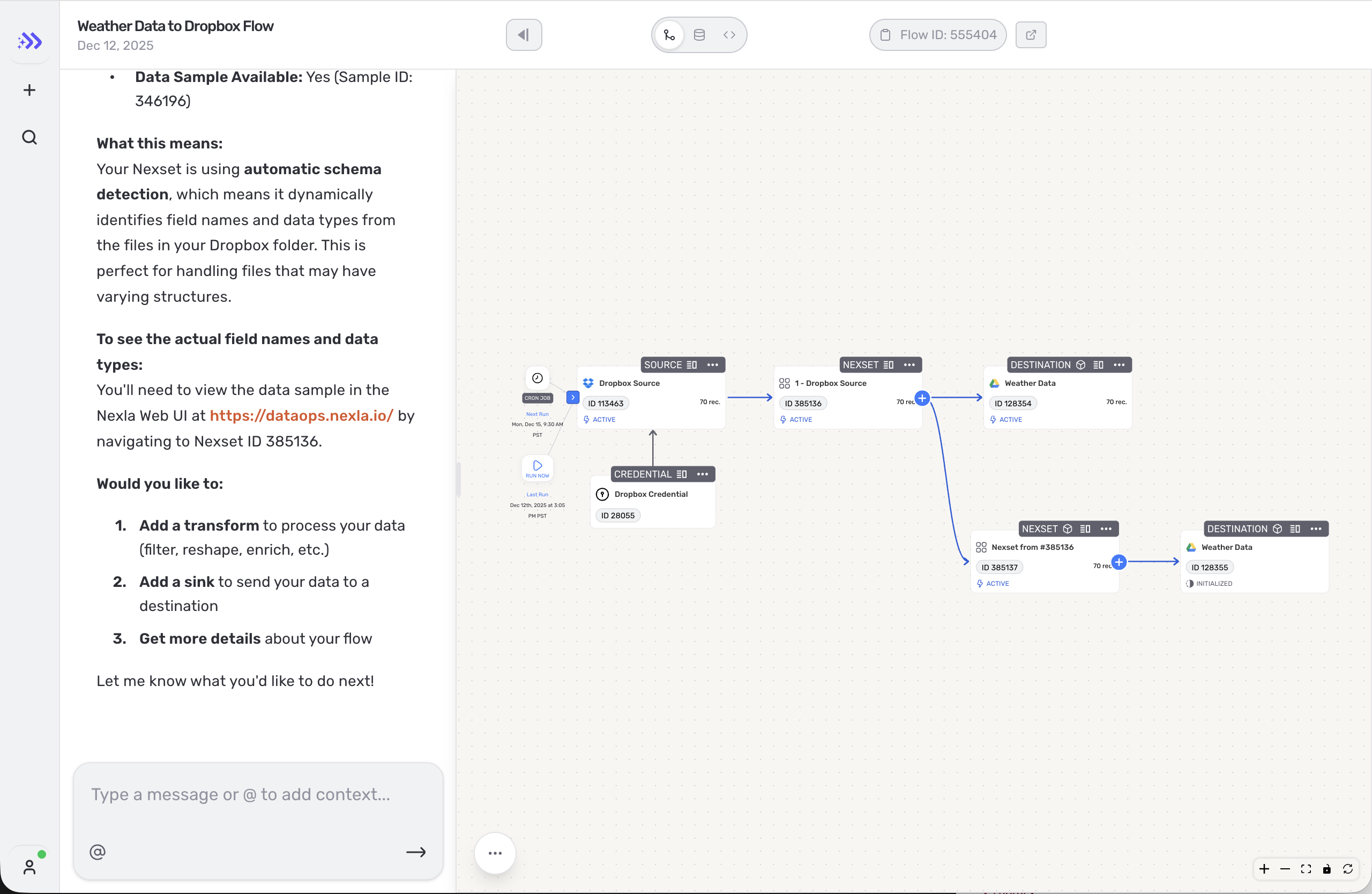
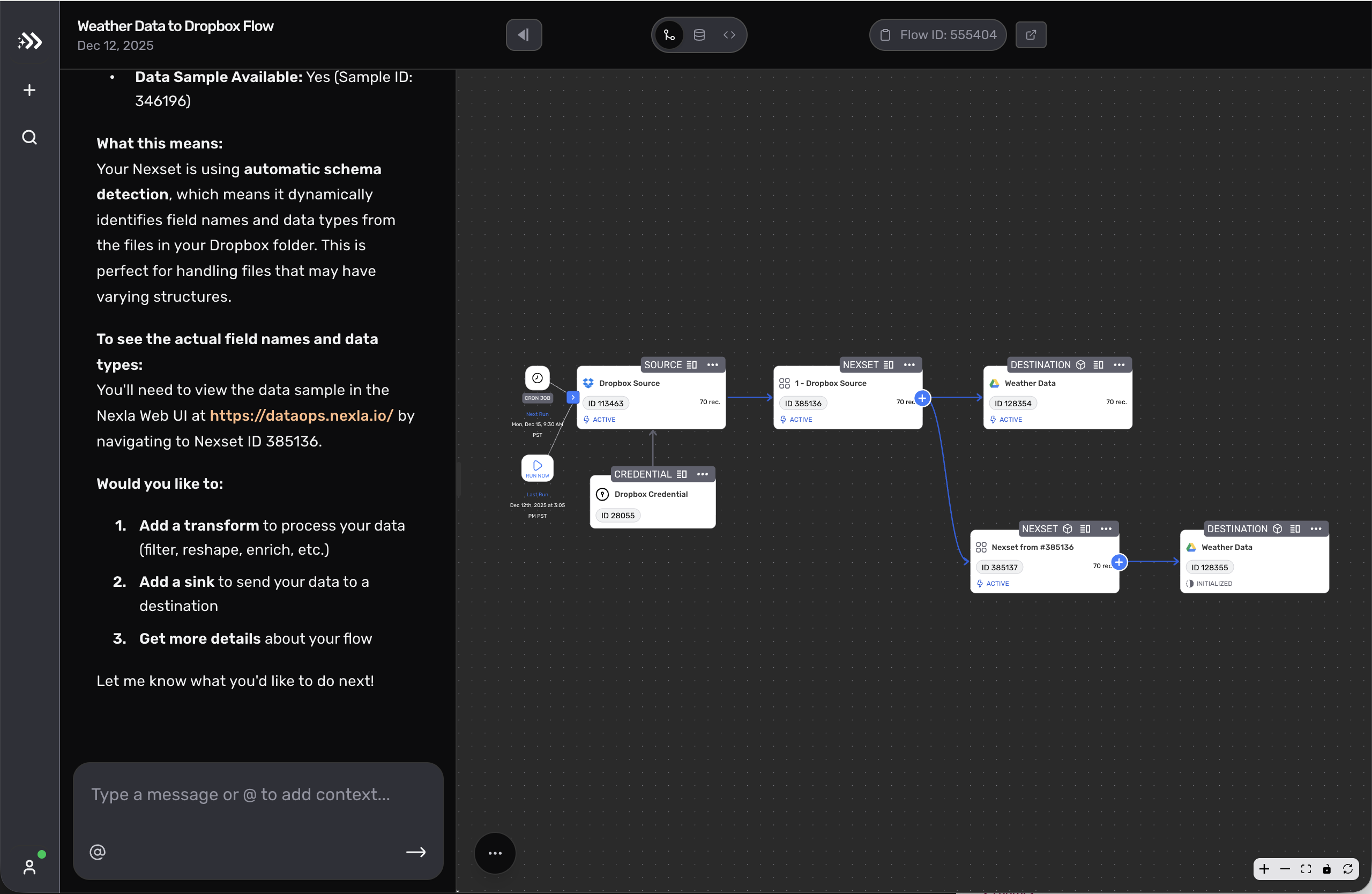
Prompt-first authoring lowered the barrier to getting started, but it also created a new trust problem. When credentials failed, generated steps stalled, or connector behavior was inconsistent, users had too little context to tell the difference between a recoverable issue and a broken path.
The missing context made the product feel asymmetrical: fast when the happy path held, but opaque when reality intruded. For a workflow product, the failure mode was serious. Users needed a reliable way to understand state, make the next decision, and recover without starting over.
The experience was powered by an XML DSL that let the agent generate interface components on the fly. The XML flexibility was powerful, but it also meant the product needed a stronger interaction model than a traditional handcrafted flow. Without clear constraints, generated forms and actions could vary in ways that felt unpredictable or hard to trust.
The design challenge was to support two legitimate user needs at once: a guided path for people who wanted to move quickly through prompts, and a reliable escape hatch for people who needed the precision of direct canvas editing.
I defined the work as a recovery problem. The agent could only be useful if the product constrained what it could ask for, clarified the role of each generated component, and defined what happened when the guided path could no longer explain a safe next move.
The review process checked each generated step against a practical list: what state is visible, what action is safe, what retry path exists, and when should control move back to the canvas?
| Decision | Direction | Why it mattered |
|---|---|---|
| Guided path vs canvas handoff | Keep manual canvas editing as an expected branch, not a failure state. | Technical users needed a clear return path when generated setup ran out of useful context. |
| Credential failure behavior | Show the failing credential, reason, affected step, and safe retry options. | A failed credential should not make the whole generated flow feel broken. |
| Generated action completion | Keep pending backend sync and last known state visible until the action actually resolves. | The UI needed to avoid claiming completion before the system could defend it. |
| Future generated forms | Define reusable behavior for state, safe action, retry, fallback, and completion. | One-off generated screens would not scale without a shared behavior model. |
| Trigger | Agent input | Visible UI state | Hidden diagnostic detail | Allowed user action | Fallback / handoff | Measurement |
|---|---|---|---|---|---|---|
| Prompt creates a source, form, or quick action. | User prompt, connector type, required fields, and unresolved assumptions. | Generated component, source, required fields, and review-before-commit status. | Prompt trace, schema mismatch, and unneeded connector metadata stay out of the main UI. | Review, regenerate, edit prompt, or repair fields before commit. | Preserve context and return to the canvas if the generated path cannot explain a safe next move. | Guided setup completion and field repair rate. |
| Credential check fails or auth is missing. | Credential requirement, connector response, and affected step. | Failing credential, reason, affected step, and safe retry options. | Full auth payloads, tokens, and low-level connector logs stay diagnostic. | Re-authenticate, choose another credential, inspect requirement, or retry. | Repeated failure or missing connector capability opens canvas handoff instead of treating the whole flow as broken. | Credential recovery and retry completion. |
| Generated action starts before backend confirmation. | Pending action, last known backend response, and requested operation. | Pending sync, last known state, and honest completion status. | Queue status and backend detail stay available for debugging, not primary copy. | Wait, retry, or inspect the pending step. | Do not claim completion until the backend can defend it. | False-complete reduction and retry resolution. |
| Generated setup exceeds the guided path. | Current nodes, completed steps, and connector edge case. | What is complete, what still needs manual control, and which nodes carry forward. | Advanced connector detail stays in diagnostic surfaces until requested. | Open the canvas with generated nodes preserved. | Hand off without restart and keep generated work inspectable. | Canvas handoff without restart. |
In reviews, generated steps landed best when they were inspectable: a credential choice with a clear consequence, a quick action with an obvious next state, or a canvas handoff users could recognize. Trust dropped when credentials were invalid, actions appeared complete before backend sync finished, or a connector returned a state the UI could not explain.
A bad suggestion was only part of the issue. The product was too quiet at the exact moments users needed orientation. Was this retryable? Was it safe to continue? Should they move to the canvas and take over manually?
The design kept prompt-first setup, but made each generated component answer a practical question: what is being asked, what changed, and what can the user do next? Forms and quick actions stayed in the guided path, while the canvas remained the place for direct editing when the generated path could not explain a safe retry or next step.
Manual editing became a normal branch of the flow, not a failure state. Treating manual editing as expected flow let the assistant speed up setup without asking technical users to keep trusting it after credentials, connectors, or generated steps got messy.
We partnered closely with engineering around the reliability moments most likely to shape user trust: credential selection, recoverable failure states, and completion signals that stayed honest when the backend still had unresolved work. The engineering goal was to make the assisted path dependable under real connector constraints.
Dependability required discipline in both product language and interaction behavior. We prioritized the states the team could defend, clarified the points where user control resumed, and avoided design decisions that would make the system feel more capable than it really was.
Status: implementation-ready setup behavior that made assistant state visible, showed where control resumed, and explained how to proceed when the guided path stopped being the best option.
The work gave the team reusable interaction rules for future generated forms and quick actions: every assisted step needed a visible state, a clear handoff, and a recoverable next move.
Validation plan: track guided setup completion, credential recovery, retry completion, and manual canvas handoff without restart.
Users trust AI-assisted setup more when the boundaries are visible. They can accept automation when they can see state, understand whether retry is safe, and know exactly how control returns to them.
The same principle carries into products that add generated steps to real workflows: each suggestion has to be easy to inspect, correct, and recover from before another automated layer helps.
Built a review tool that helps agents center generated screens on the user's work before UI generation, keeping prompts, schemas, tool calls, and review terms out of the product surface.
JudgmentKit MCP started from a specific failure mode in generated interface work: agents can produce polished screens before they understand the activity those screens are supposed to support.
JudgmentKit adds a review step before generation: the agent names the user's job, translates it into actions and support cues, decides what should stay hidden, and defines the build handoff before drawing the UI.
The evidence is the committed comparison and replayable review chain: a recurring agent failure mode becomes a reusable check before UI generation.
The repo includes deterministic demos and paired artifacts, keeping evidence tied to visible output instead of a better-sounding explanation. The refund triage pair shows the core shift: the raw screen follows backend controls, while the guided screen follows the review activity.
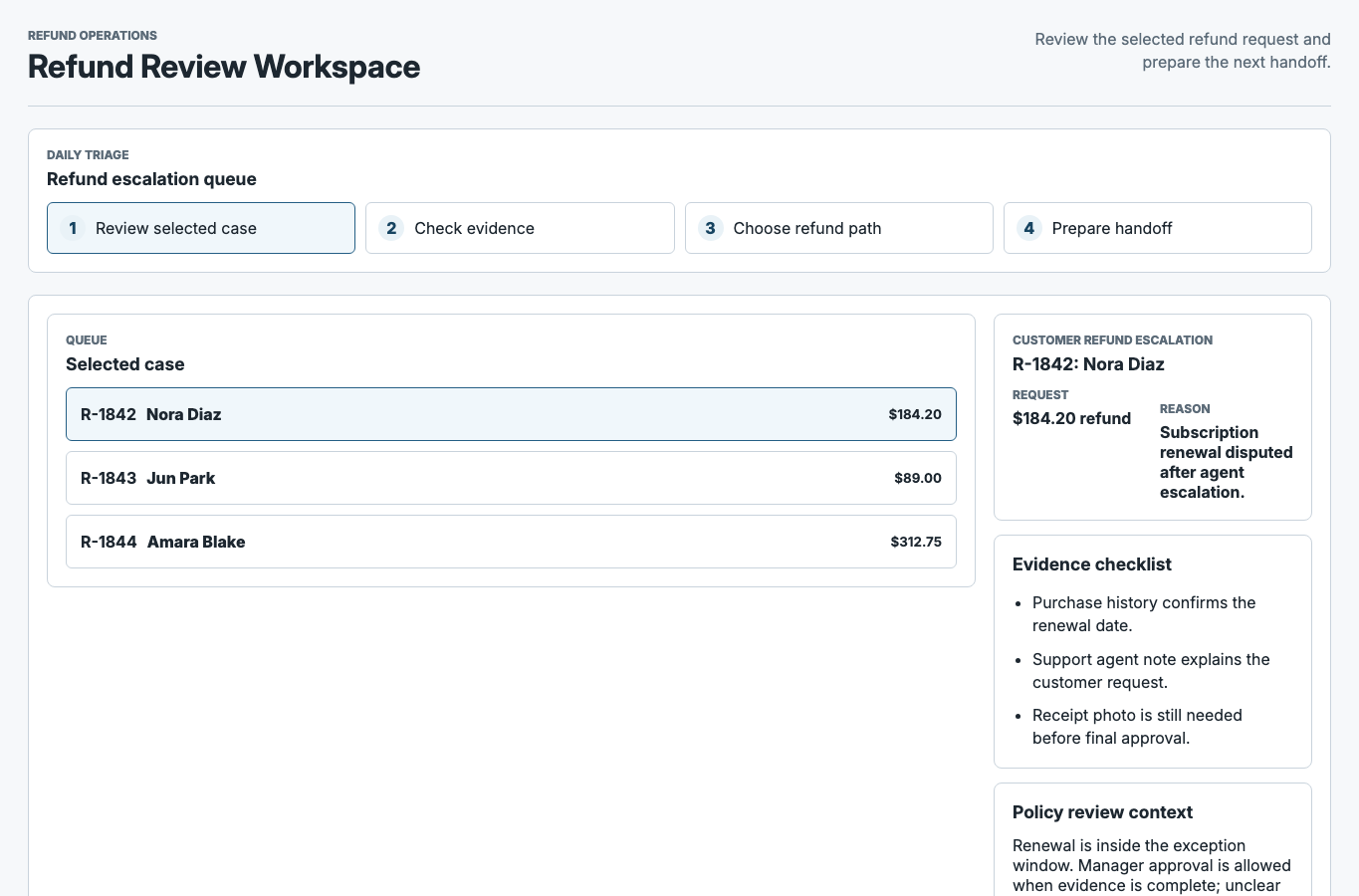
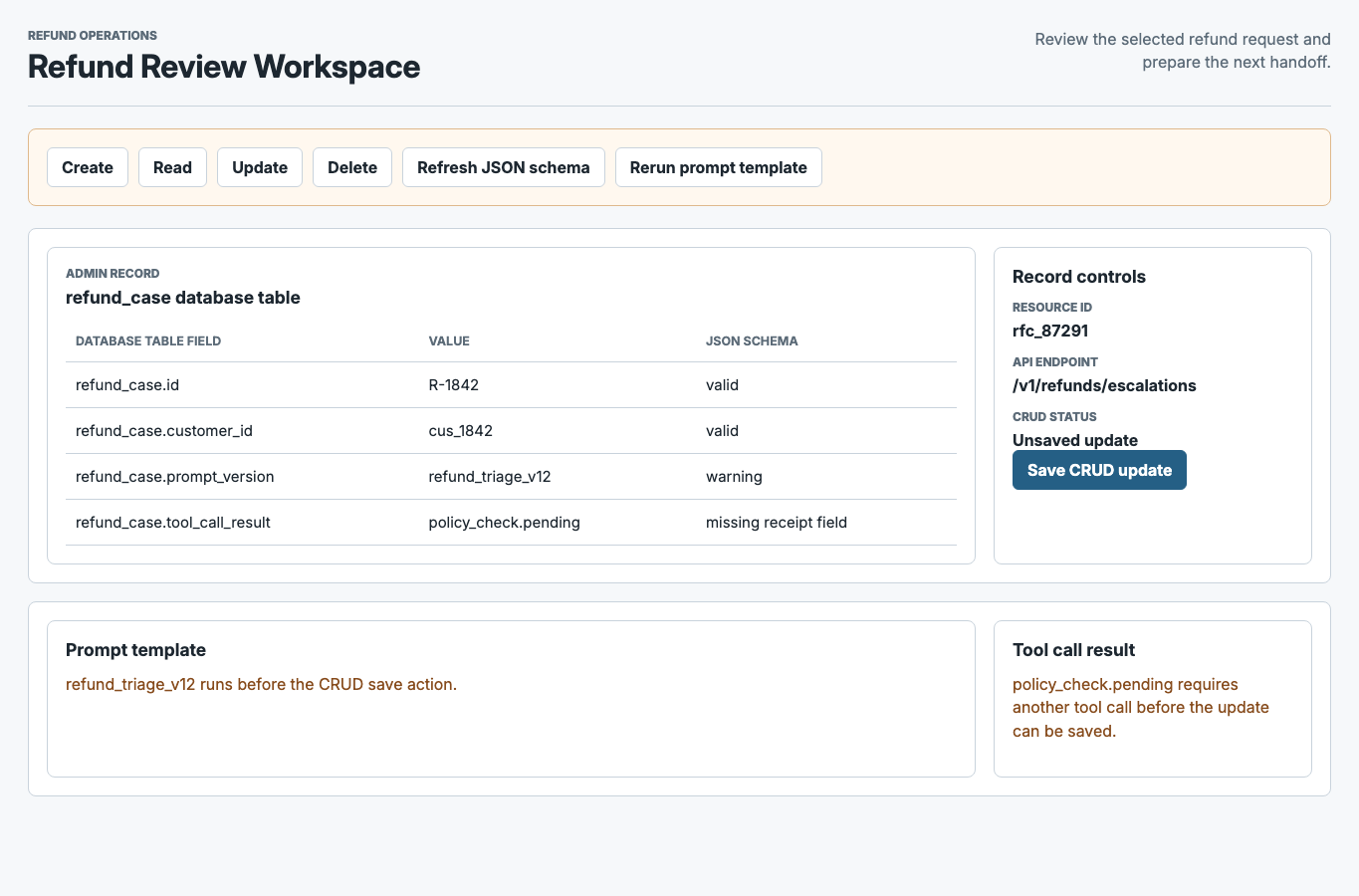
original prompt -> raw UI -> JudgmentKit review -> generation handoff -> repaired UI -> review score
| Step | Artifact | What changes |
|---|---|---|
| Original prompt | The same refund-triage brief is used for both paths. | The comparison stays about the screen behavior, not a more helpful prompt. |
| Raw UI | Baseline screen exposes CRUD controls, schema status, prompt templates, and tool-call state. | Visual polish masks that the user is being asked to operate the backend. |
| JudgmentKit review | The review names the activity, user actions, hidden details, and handoff needs before UI repair. | The agent gets explicit guidance on what the user should see. |
| Repaired UI | Guided output centers the selected refund case, evidence, policy context, and handoff decision. | The user reviews a case instead of operating backend controls. |
| Review score | Compare activity fit, hidden-detail control, recoverability, and handoff quality. | The evidence becomes replayable instead of anecdotal. |
| Trigger | Tool input | Visible product surface | Diagnostic detail | Allowed action | Fallback / handoff | Measurement |
|---|---|---|---|---|---|---|
| Agent receives a UI generation brief. | Prompt, user activity, domain rules, artifacts, and desired outcome. | Activity, user actions, support cues, completion criteria. | Backend fields, prompt templates, schema language, and tool-call mechanics stay out of the primary UI. | Generate or repair the UI around the user's activity. | Produce a frontend handoff with hidden-detail rules and implementation notes. | Activity fit and hidden-detail leakage. |
| Raw UI exposes backend controls. | Baseline screen, review rubric, and raw/guided comparison pair. | Case review, evidence, policy context, and handoff decision. | CRUD controls, schema status, resource IDs, and prompt/debug language stay diagnostic. | Repair the screen or reject the surface if the activity is still wrong. | Handoff names what changed and what should remain hidden. | Rubric delta across activity fit, recoverability, and handoff quality. |
Generated UI work often breaks when the backend model becomes the user experience. Tables become screens, schemas become forms, prompt templates become product vocabulary, and tool results become buttons.
JudgmentKit sits before UI generation hardens backend language into the product surface. The MCP layer gives Codex, Claude, and other clients a shared way to review the work first, without making any single frontend stack or design system the center of the product.
Website: judgmentkit.ai
Built the design organization's first shared ladder and performance system, then tied it to coaching, calibration, and clearer product/design decision rights.
Evidence snapshot:
| Before | After |
|---|---|
| Growth expectations lived in manager-by-manager interpretation. | Shared ladders gave product design, brand, and research one comparable language. |
| Critique, feedback, and calibration were inconsistent. | A recurring rhythm connected critique, planning, manager 1:1s, and performance calibration. |
| Product/design ownership was too personal and local. | Scope and decision-rights language made ownership easier to discuss before handoff. |
| Leadership approval was needed, but the team needed usable language. | The case separates what I authored, what managers and designers tested, and what leadership approved. |
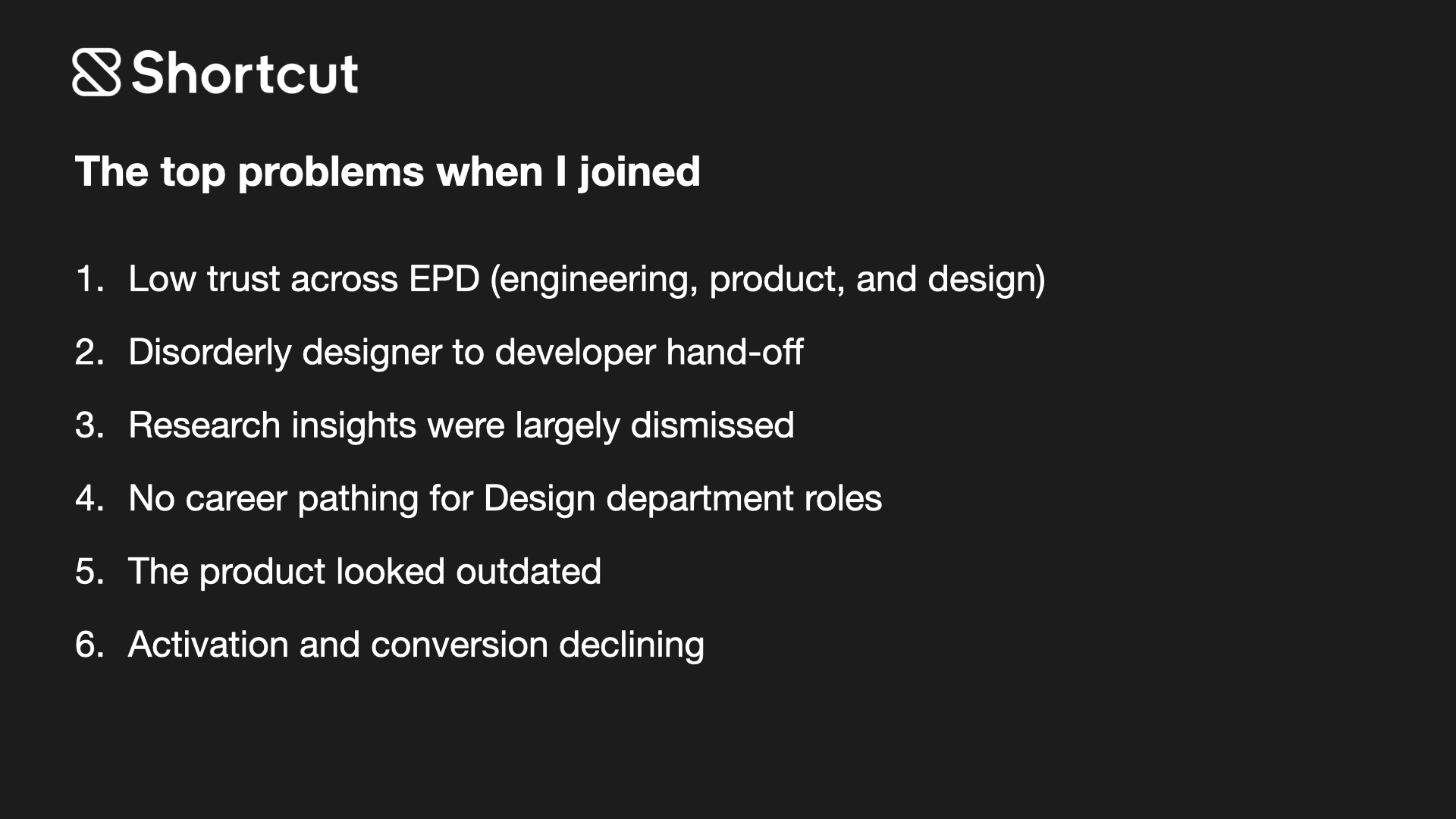
The work started during a period of growth when design needed clearer management structure while product, brand, and research work kept shipping. The immediate challenge was to create clear career paths across disciplines, reduce calibration inconsistency, and make product/design decision rights easier to discuss before they turned into delivery problems.
We built a shared ladder and performance system so expectations were explicit, comparable across disciplines, and usable in coaching and calibration. The useful outcome was the manager language: one-on-ones, promotion conversations, and product/design planning relied less on local rules in each conversation.
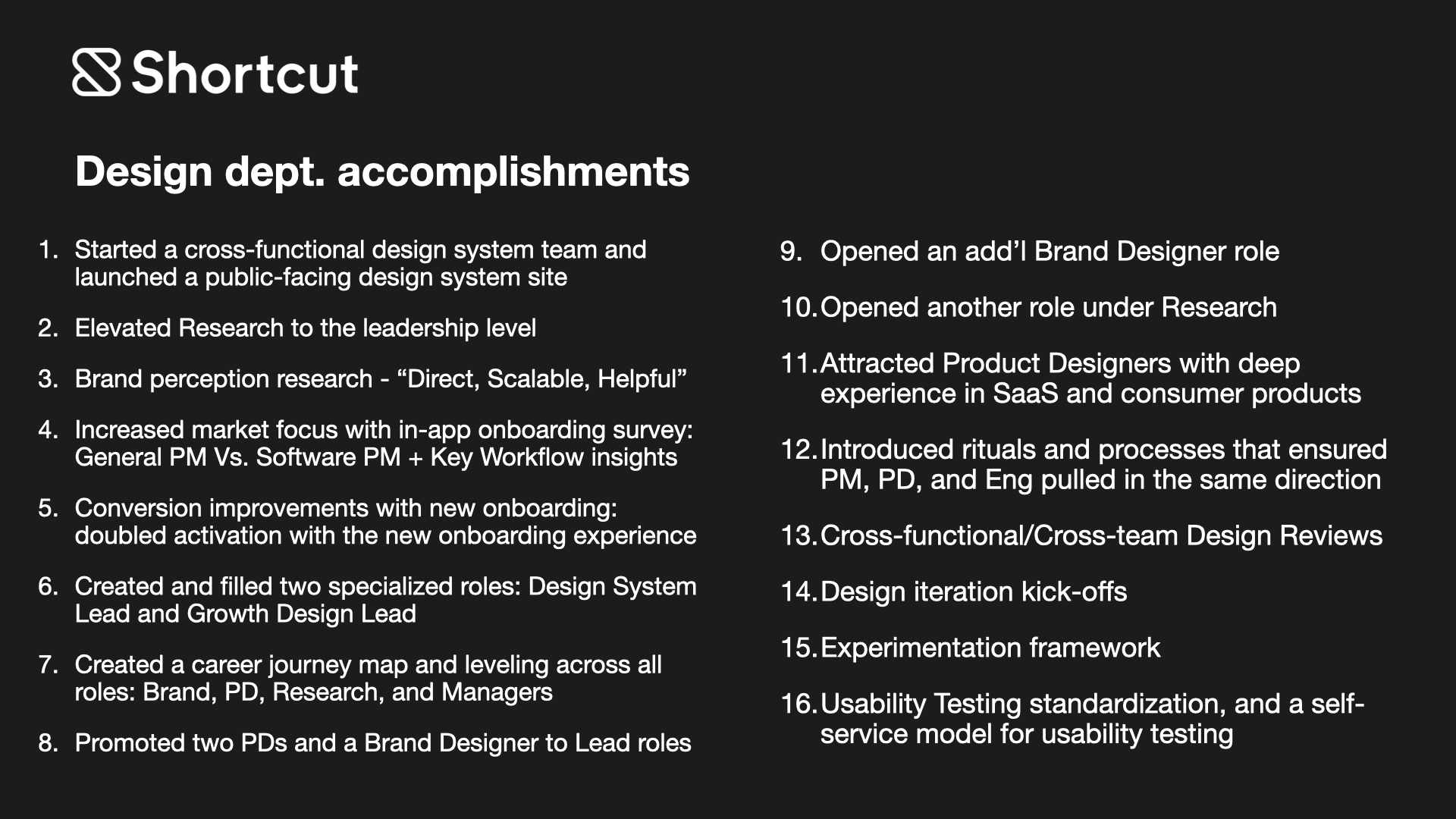
The organization had talented designers, but it did not yet have a shared way to talk about level, growth, or cross-disciplinary expectations. Managers were being asked to evaluate scope, craft, and leadership without a common language, which made calibration inconsistent and made advancement harder to explain or defend.
The ambiguity affected more than performance cycles. Unclear expectations showed up as handoff ambiguity, uneven critique patterns, unclear ownership, and decision-rights confusion across product/design work.
The team was already shipping work across product, brand, and research, so the answer could not be a long internal strategy exercise detached from delivery. Any new performance system had to work while the organization was still moving, and it had to support both managers trying to coach well and designers trying to understand what growth actually looked like.
The delivery context created the central constraint for the work: move quickly enough to help the team now, but build something durable enough to support future hiring, compensation, and promotion conversations.
We started by defining a shared set of principles for how the organization should talk about scope, craft, and leadership, then translated those into discipline-specific expectations for product design, brand, and research. The test was whether managers could use the language immediately in one-on-ones, feedback, calibration, and promotion readiness without translating it differently person by person.
We pressure-tested the language with peer leaders and coaching networks to catch title inflation, discipline-specific silos, and wording that sounded polished but failed in real coaching. Peer review kept the ladder practical and made manager adoption more likely once it moved into use.
Reviewing manager notes, feedback patterns, and recurring confusion in growth conversations made the root issue clear: similar impact was being described differently depending on whether the work came from product design, brand, or research. Inconsistent descriptions made fair calibration harder. Critique notes showed a related pattern: strong artifact feedback often became a one-off correction instead of reusable guidance.
Cross-functional conversations exposed handoff ambiguity and decision-rights confusion. Product/design partners were often negotiating scope locally: who owned the product story, what quality bar applied before engineering handoff, and how critique decisions carried into delivery. The product artifacts in this case show those behaviors in context: unclear onboarding intent, cluttered app patterns, and a product story that needed clearer shared ownership.
I also directed onboarding research and experimentation. One onboarding A/B test showed a 110% improvement in activation. The test measured activation; the ladder's adoption evidence is manager use in coaching and calibration.
Product friction showed where alignment broke down
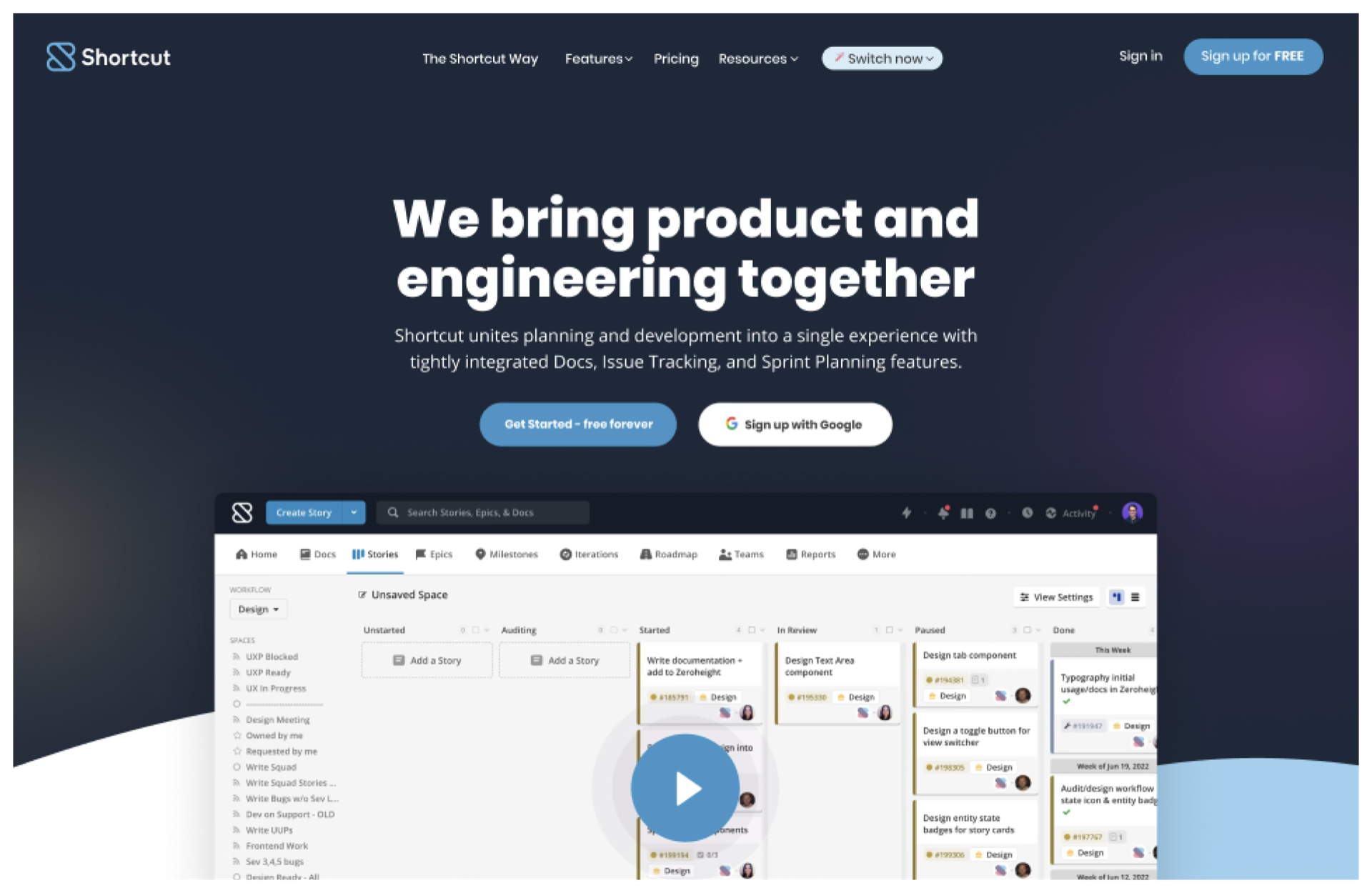
The 2.0 prototype and brand critique sit inside that evidence set as supporting artifacts. The prototype showed we could simplify the interface, and critique exposed the missing reusable brand and system layer. Together, they gave managers and designers a concrete example for discussing critique follow-through, handoff quality, and repeatable standards.
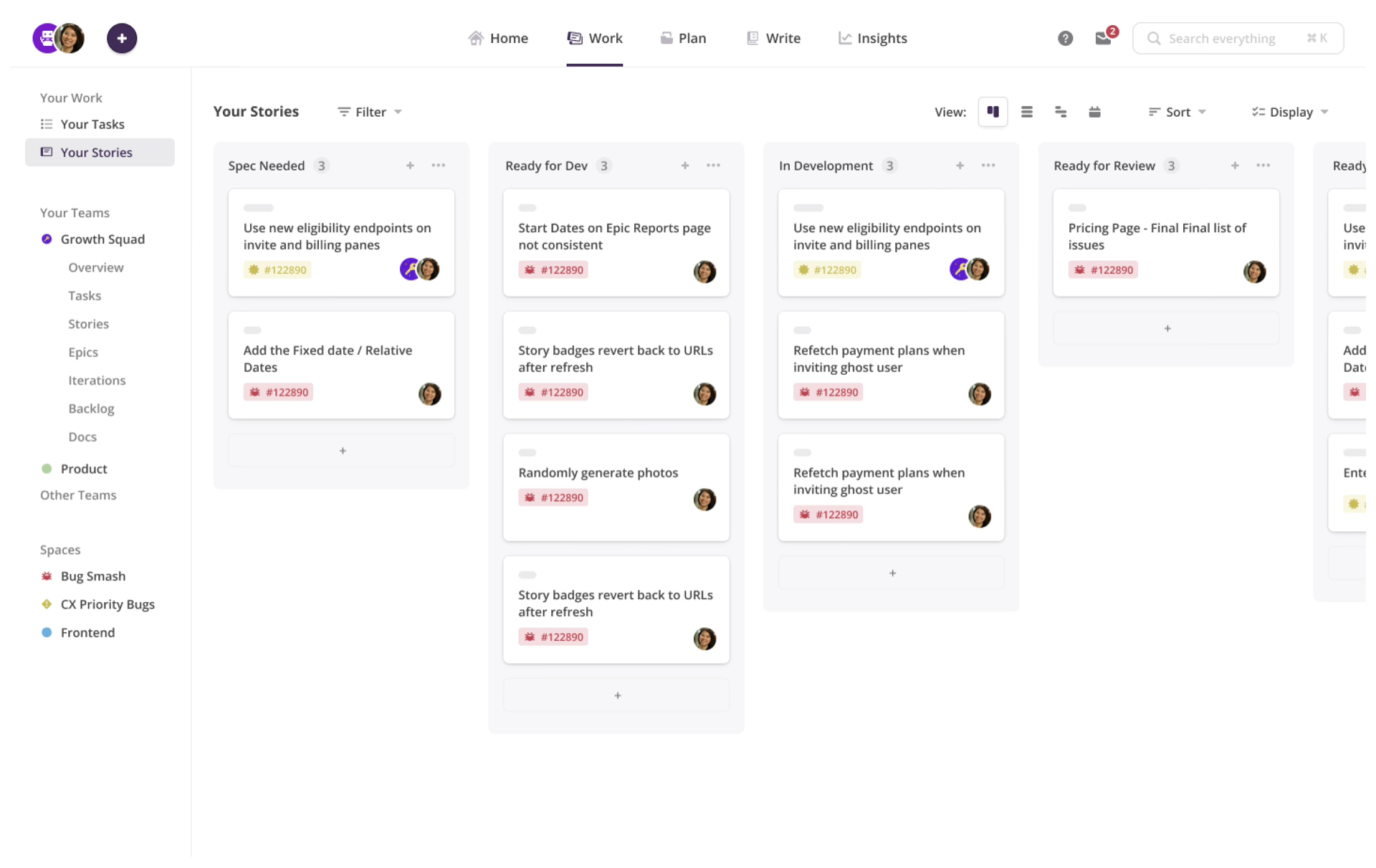
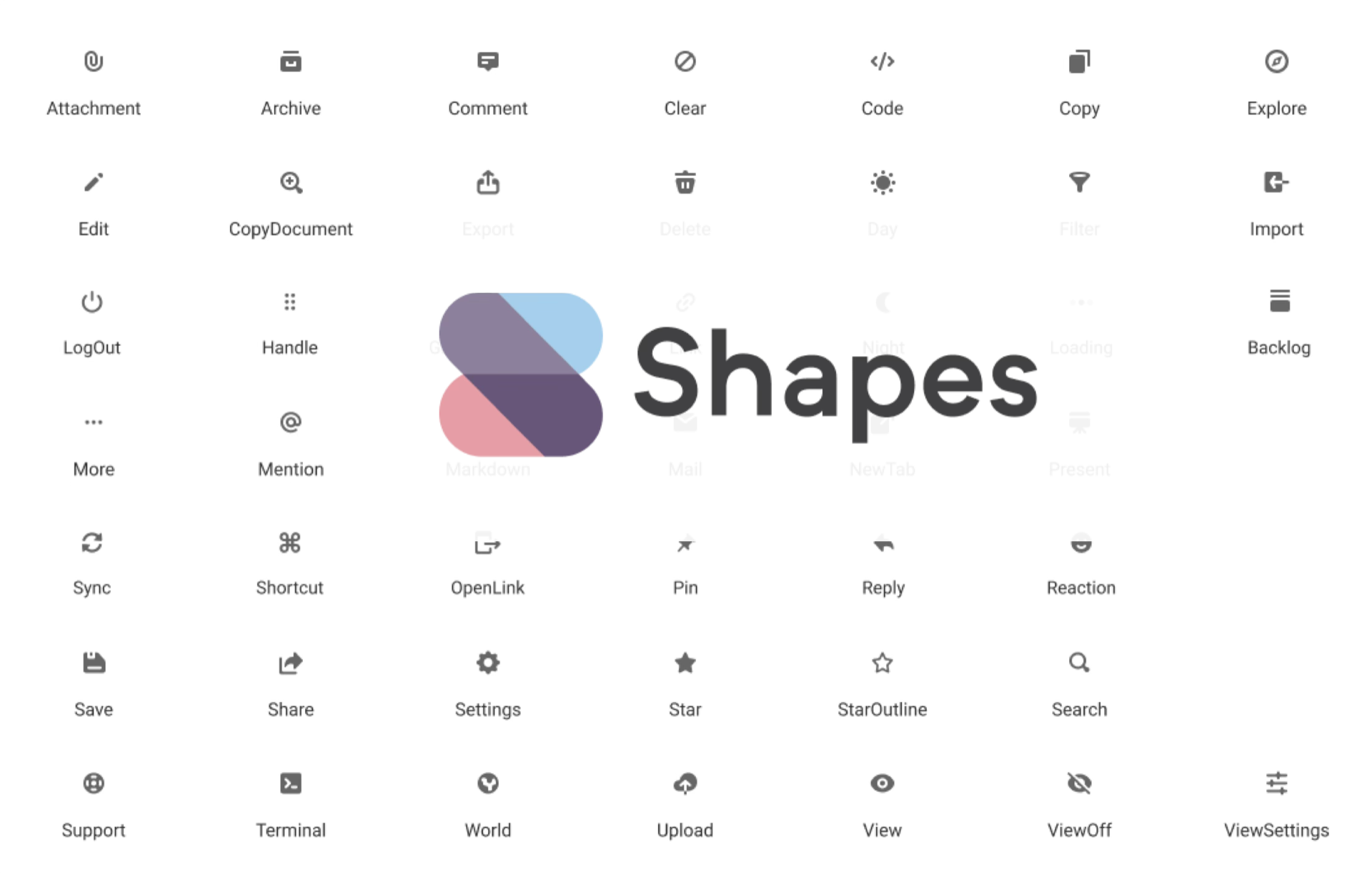
The final package had three pieces: ladders tailored to each discipline, a shared competency spine, and performance language that translated expectations into coaching. We mapped scope, collaboration, and leadership behavior so managers could compare impact across product design, brand, and research without each group inventing its own standard.
Then we put the language into a regular coaching rhythm. The ladders became a working tool for feedback and development plans, and gave product/design leaders a less personal way to talk about handoff ownership and decision boundaries.
Key Operating Decisions:
| Decision | Direction | Why it mattered |
|---|---|---|
| Comparable ladders across disciplines | Build one shared structure across product design, brand, and research. | Calibration needed a shared language without flattening the disciplines into one generic role. |
| Usable coaching language before a perfect artifact | Put practical language into manager conversations quickly. | Managers needed to use it in 1:1s, feedback, and promotion readiness discussions while the org was still moving. |
| Peer review before broad rollout | Pressure-test the ladder with peer leaders and coaching networks. | Adoption depended on language people could use in live review, not a polished artifact handed down late. |
| Decision rights inside the ladder | Name scope, ownership, and decision-boundary expectations directly. | Product friction was showing up in handoff and critique, so the ladder needed to address collaboration and levels together. |
| Level signal | Example expectation | Calibration use |
|---|---|---|
| Scope | Owns ambiguous cross-functional work where product direction, user evidence, and execution constraints are still in motion. | Manager prompt: "Which ambiguity did this person resolve, and who can now move because of it?" |
| Collaboration | Makes tradeoffs explicit with product and engineering before handoff, then follows through in critique and delivery review. | Calibration use: separate unclear handoff expectations from personal style feedback. |
| Leadership | Raises the quality of decisions around the work, not only the quality of the artifact. | Decision changed: reward reusable judgment and follow-through, not only who presented the final design. |
| Dimension | What the ladder made explicit | How it changed decisions |
|---|---|---|
| Scope | What size and ambiguity of work a designer should own. | Promotion and staffing conversations had a shared reference point. |
| Craft | What strong product, brand, or research work looked like at each level. | Feedback became less subjective and easier to connect to observable work. |
| Collaboration | How designers should handle product/engineering handoff, critique follow-through, and cross-discipline work. | Product/design friction could be discussed as expectations, not personality. |
| Leadership | How influence, mentoring, and decision quality should scale. | Managers had clearer coaching language for growth past individual execution. |
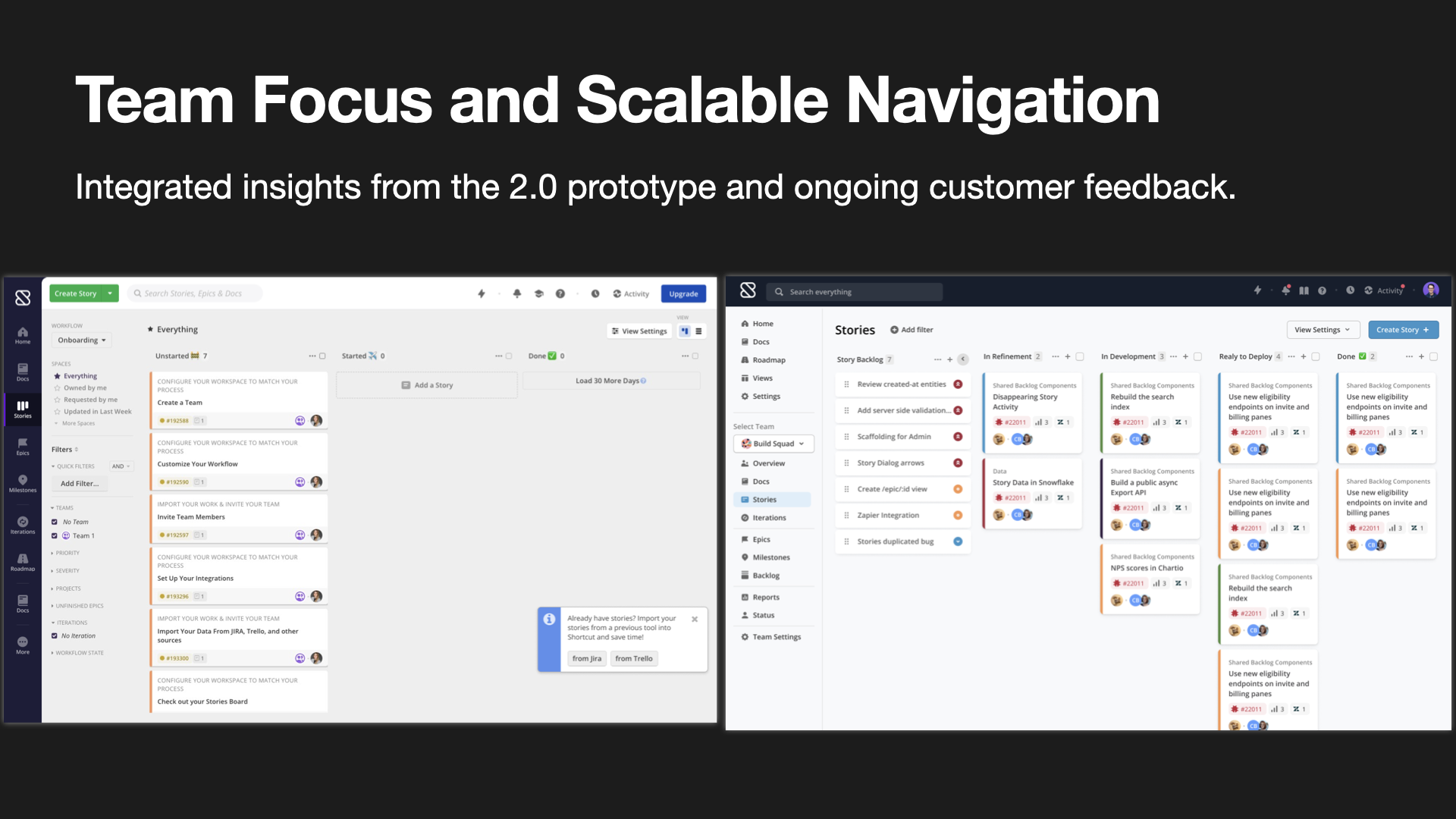
We rolled the performance system out iteratively rather than treating it like a top-down announcement. Early drafts went through managers and designers first, because the test was whether the language held up in real conversations, not whether it looked complete in a presentation.
Within about the first month, we had qualitative manager adoption: a usable version was already supporting live coaching and calibration. From there, the work shifted from definition to adoption: tightening unclear wording, using the language in performance discussions, and reinforcing the same decision-rights expectations in cross-functional planning.
| Evidence | What it shows |
|---|---|
| Early drafts went through managers and designers before broader rollout. | The rollout tested whether the language worked in real conversations, not only in a leadership deck. |
| Peer leaders and coaching networks reviewed the ladder. | The language was pressure-tested for clarity, title discipline, and cross-discipline usefulness. |
| Within about the first month, the performance system was being used for live coaching and calibration. | Qualitative adoption started before the system was theoretically complete. |
| Managers used the language in 1:1s, feedback, and performance discussions. | The ladder moved into recurring management practice rather than staying a standalone artifact. |
| Product and design teams applied the language in planning and critique. | Scope, ownership, and decision boundaries became easier to discuss as expectations instead of personalities. |
Redacted manager cadence:
The organization came away with a more credible growth system across product design, brand, and research. Designers had clearer visibility into what advancement required, and managers had a more consistent tool for coaching, calibration, and promotion readiness.
The same language gave product and design leaders a clearer way to discuss handoff ownership, critique follow-through, and decision boundaries, so later planning conversations depended less on personal interpretation.
Org-design work needs the same discipline as product work, but the test is behavior change. The ladder mattered only if managers used it when the stakes were real. We rolled it out while work was still moving, tested the language in live conversations, and traded theoretical completeness for something people could use that month.
If the work were revisited, the first change would be adding adoption measurement earlier. Future revisions should have direct evidence from ladder use, not only manager anecdotes. The core decision would not change: start with clarity people can use now, then scale the system once the language is working in real conversations.
Approved a v1 design package for a source -> code -> destination workflow, with explicit state and a proposed shorter test loop for implementation handoff.
Custom code was powerful but behaved like an internal tool:
A guided, IDE-like authoring model:
| Old setup path | New workflow path |
|---|---|
| Pick file source settings, then discover custom processing inside a dense configuration path. | Start from a source -> code -> destination scaffold. |
| Copy a file path out of one context and paste it into another before testing. | Select a source file directly, preview/download it, then run code against that file. |
| Switch between drawer, modal, output pane, and canvas without a stable editing model. | Stay in an IDE-like workspace with editor, console, logs, and runtime settings visible. |
| Treat reusable processors as a disruptive branch. | Choose write-new or library up front, then continue in one editing model. |
"Much of it is user experience... the same things that people have complained now for over two years on usability."
Internal review (Nov 2025)
"The flow to do that is really counterintuitive... you need to put a file path... hard-coded... then copy/paste."
Internal review (Oct 2025)
"The test here is slow and painful... you can't debug... error message is not easy."
Internal review (Oct 2025)

Custom Code v1 Reality Check Before Redesign
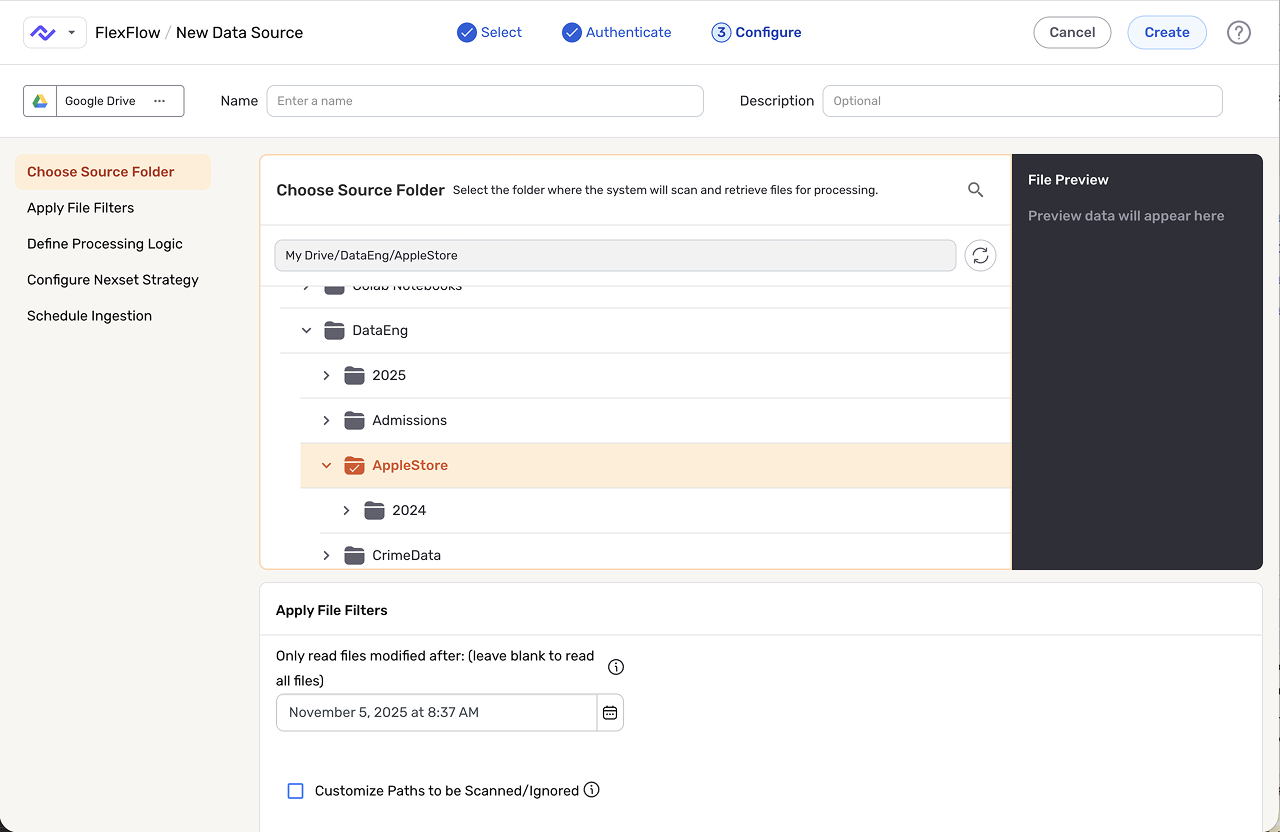
The state model moved the work out of screen-by-screen debate and into behavior the team could review. Before committing to detailed UI, I named the valid lifecycle states, transitions, and impossible combinations so CTAs, warnings, test results, and handoff behavior could stay consistent.
The model became useful in senior reviews because it translated a messy workflow into something engineering could implement and product could reason about. It also made the prototype more useful: stakeholders reacted to proposed behavior rather than layout alone.
Turning Point #1: Promote Custom Code to a Full Workspace

Early setup dropped users into too many abstract choices at once: source setup, code placement, output, and destination rules all competed for attention. Pre-seeding the source, code processor, and destination gave users an immediate route to the first file test instead of asking them to assemble the canvas from memory.

"We have multiple patterns in the UI in how we handle the custom code... we need a consistent pattern."
Internal review (Nov 2025)
"When I go to provide your own function, we have some code already... Half the screen is documentation... confusing."
Internal review (Nov 2025)
Make the choice explicit upfront, then keep users in a single, stable editing mode.
A state machine defined valid transitions so we could:
"You cannot just select it from here and test it right away… copy this path… paste."
Internal review (Oct 2025)
"The only caveat is… we need a public-facing repository with the Docker image…"
Design review (Nov 2025)
"Telling them to bring the code in our UI and just run it… is always going to be painful. Debugging breakpoints will be hard."
Internal review (Nov 2025)
Approved handoff: the team approved a v1 design package for implementation: source -> code -> destination became the shared model, the design specified a primary path intended to remove file-path copy/paste, and the proposed test loop kept source file, editor, output, logs, and runtime settings in one place.
Reviews shifted from isolated screen preference to the behavior model: where code lives, how testing works, which state is valid, and when the user can continue.
Validation plan: after implementation, compare old setup steps against the new scaffolded path, track successful cloud-test completion, watch for continued path-copy workarounds, and review whether users could recover from test errors without leaving the workspace.

Reframed schema templates as reusable data contracts, then defined the authoring and apply behavior engineering could build.
Schema templates were capturing field names, but not enough meaning, validation logic, or import behavior to work as reusable data contracts.
When we joined this problem, "schema templates" already existed, but they were not yet functioning like reusable contracts. Teams could capture field structure, but they still had to rely on documentation and tribal knowledge to understand meaning, validations, and what would actually happen when a template was applied.
We reframed the work around a simpler promise: a template should help a team move from create to preview to apply without ambiguity. The reframing turned the feature from a loose collection of authoring and mapping ideas into one workflow product and engineering could align on, build, and measure.
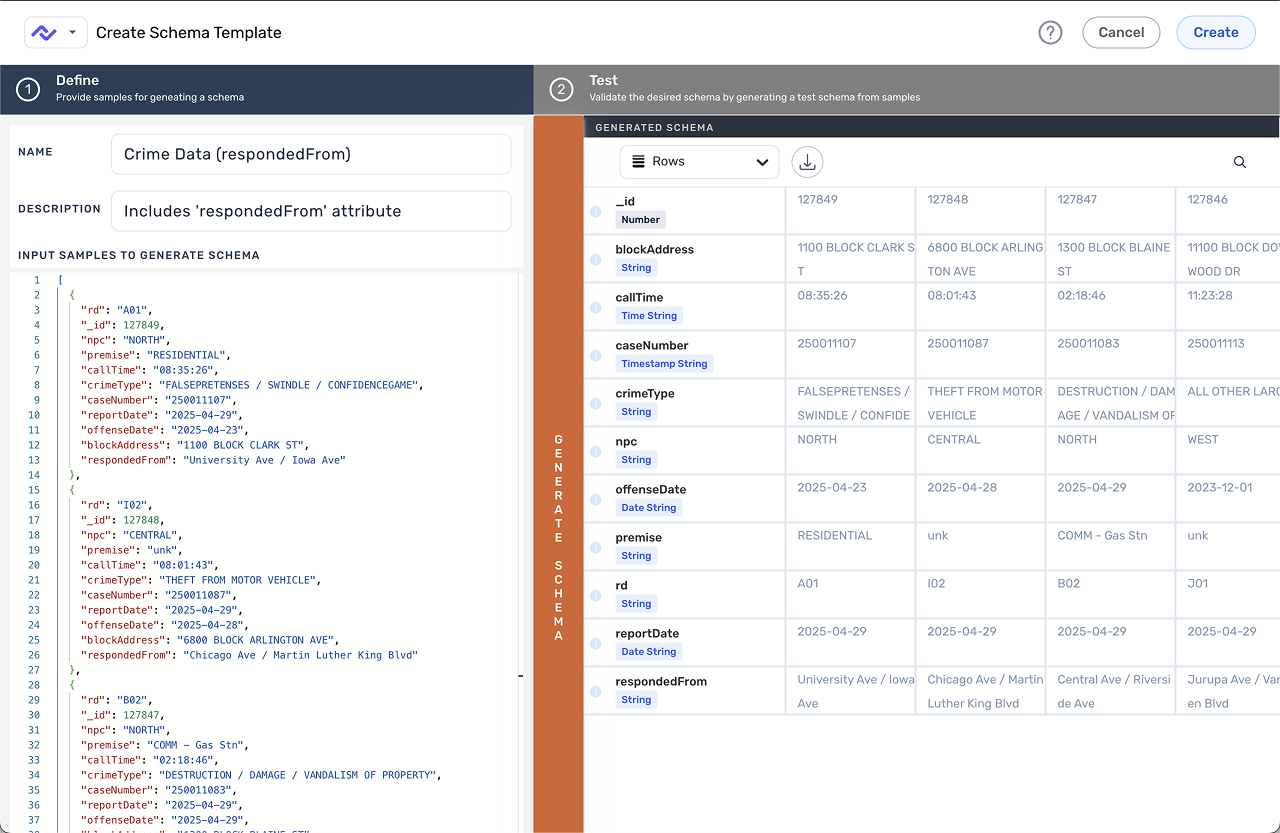
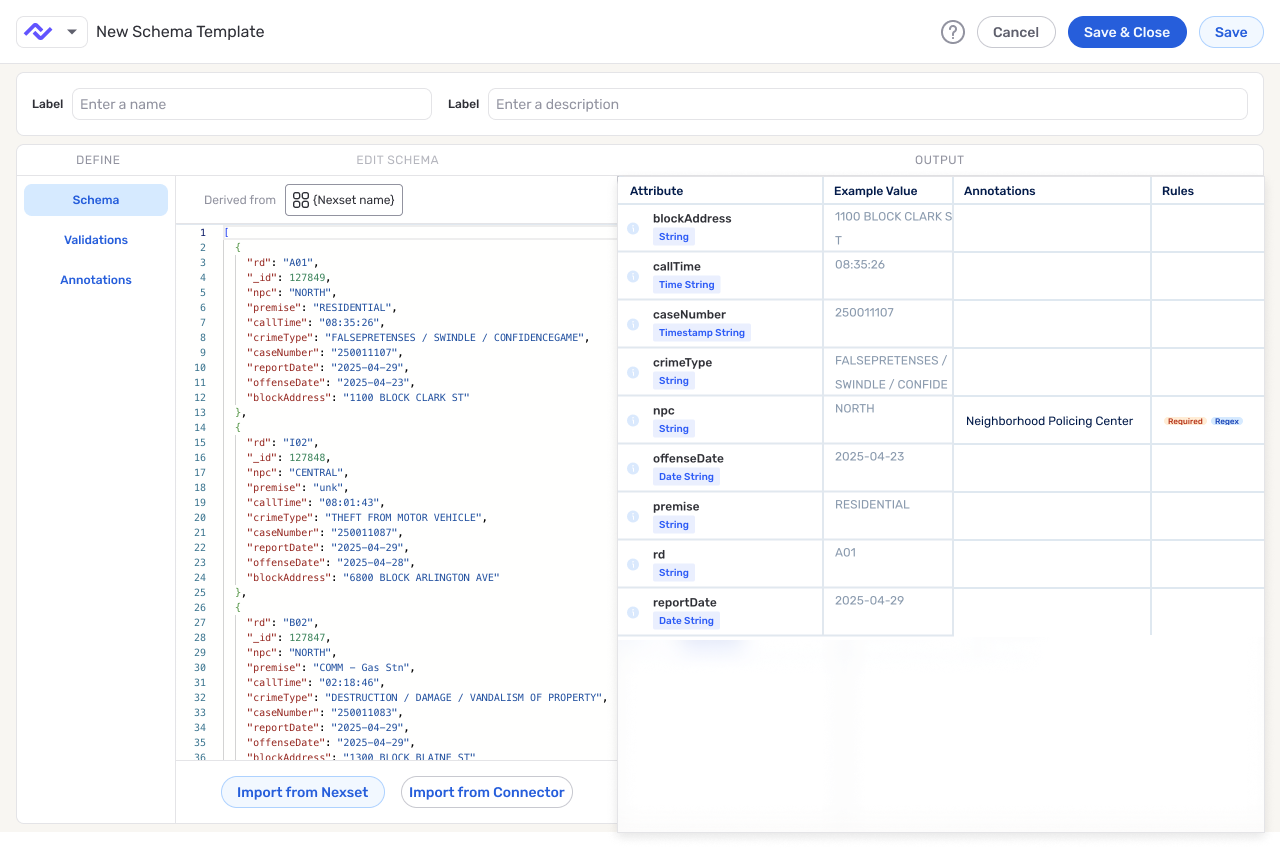
Most of the UX debt came from ambiguity, not missing capability. Mapped and unmapped fields were mixed together, calls to action changed meaning depending on context, and authoring still behaved like a sample-driven setup instead of a reusable contract definition tool. On the implementation side, the underlying system was already persisting separate JSON structures, which made it easy for technical complexity to leak into the user experience.
As one Eng/PM partner put it, "There's three separate JSON blobs I'm saving." The result was predictable: operators had to interpret too much before they could trust an import, and contract owners had no clear model for defining rules at scale. The feature existed, but the workflow did not.
| Ambiguity | Cost to users | Cost to the team |
|---|---|---|
| Mapped and unmapped fields mixed together | Operators had to hunt for the gaps that actually needed attention. | The apply flow could not focus effort on the riskiest decision. |
| CTA meaning shifted by context | Users could not tell whether they were previewing, selecting, importing, or modifying. | Handoff needed extra explanation for states that should have been explicit. |
| Three JSON blobs under the hood | Contract owners saw implementation complexity leak into the surface. | Engineering needed a UI model that reconciled separate data structures. |
| Import behavior unclear | Users could not predict what would change after applying a template. | The product risked shipping a powerful feature without a trustworthy apply contract. |

The schema template work sat inside the dataset workflow, where two different users had to rely on the same system under deadline pressure. Operators needed a fast, low-risk path to close unmapped gaps. Contract owners needed to define structure, validations, and field meaning in a form that could survive repeated reuse.
As a product lead put it, "We were trying to add garnish... when we were missing a whole side." The scope constraint shaped the mental model. A template had to carry field structure, rules, and meaning together, and the work could not split into separate products for authors and consumers. Shape, validations, annotations, preview, and apply behavior had to work as one system across two linked workflows.
The working diagram became: shape defines the expected fields, validations define what good data must satisfy, annotations explain meaning, preview shows the combined contract, and apply state makes the operator's next change explicit before import.

We narrowed v1 around three decisions. First, applying a template should start with unmapped gaps, because that is where the operator's risk and attention live. Second, selection and import states needed to be explicit, so users always knew what was about to happen. Third, rules had to appear close enough to the workflow to teach, not disappear into documentation.
The unmapped-first approach kept the work grounded in real tasks instead of trying to solve every future scale concern in v1.

The major tradeoff in reviews was how much validation detail to show inline. An inline model made scanning and one-click import faster, which mattered in the mapping flow. A tabbed model would scale better as rule density increased, but it also risked pushing essential context out of sight too early.
I selected the inline model for v1 handoff because the immediate problem was decision confidence, with information overload deferred to the scale path. The fallback was deliberate: if teams later outgrew inline presentation, tabs were a scale strategy, not a prerequisite for shipping.

The final interaction model treated authoring as three inputs feeding one trusted preview. Shape came from sample data or pasted JSON. Validations could be defined through guided controls or JSON. Annotations captured field meaning so downstream users could understand intent and structure.
On the apply side, the workflow kept operators focused on unmapped fields first, made bulk selection predictable, and clarified import states before changes landed. Together, those moves made the template behave like a reusable contract instead of an ambiguous helper.
The implementation spec turned the model into behavior engineering could build: default to unmapped fields, define select-to-import transitions, specify which authoring inputs fed the preview, and call out the edge cases where guided UI and JSON had to land on the same contract. The point was to remove decisions from the handoff, not make a prettier Figma path.
The v1 spec also named what we were not solving yet: dense validation navigation, governance signals, and heavier rule management. Those became follow-on paths after the core create -> preview -> apply loop existed.
The delivered artifact defined shape, validations, annotations, preview, and unmapped-first apply behavior in one reviewable workflow. Product and engineering could evaluate the same behavior without reconciling scattered docs, JSON behavior, and mapping screens separately.
The measurement plan focused on time to valid output, select-to-import conversion, post-import edits, and support signals. The metrics matter because they reflect the underlying goal of the redesign: fewer ambiguous handoffs and fewer mapping incidents caused by unclear apply behavior.
The case reinforced a familiar enterprise UX lesson: when a feature is confusing, adding more places to configure it often makes the problem worse. Progress came from narrowing the promise: define the contract, preview the effect, and apply it to unmapped fields.
Taking this further, the next step would be usability testing with operators using real templates, followed by governance and denser validation management. But the core handoff should stay the same: create -> preview -> apply.
Moved dashboard context from repeated local controls to one page-level mode, with jump navigation, CSV paths, and explicit chart-scope boundaries.
The redesign centered the overview dashboard on a page-level org/personal mode, clearer section order, and jump navigation for summary, read, write, and resource sections.
| Decision | Direction | Why it was the right scope |
|---|---|---|
| Page mode | One org/personal switch at the top of the dashboard. | Users should not reinterpret the same context rule in every module. |
| Wayfinding | Jump navigation for summary, read, write, and resource sections. | The overview could grow without becoming one long undifferentiated stack. |
| Chart/reporting | Keep chart placeholder regions and add CSV export paths where useful. | The release covered dashboard structure and practical exports, not a deeper analytics model. |
I led the redesign around one decision users were already making repeatedly: whether they were reviewing org-level work or personal work. The old page answered that question inside individual modules. The redesign moved the choice to the top of the page, cleaned up the section order, added jump navigation, and kept chart placeholders scoped to the reporting behavior covered by the release.
The original dashboard asked users to re-interpret context in every module. Separate org and personal toggles appeared across sections, there was no clear page-level mode, and the layout consumed a large amount of space without delivering corresponding clarity. Review feedback made the issue plain: people could read the cards, but the structure of the page did not explain itself.
Previous overview page: local toggles and section-by-section controls made the page model feel fragmented instead of establishing one clear context up front.
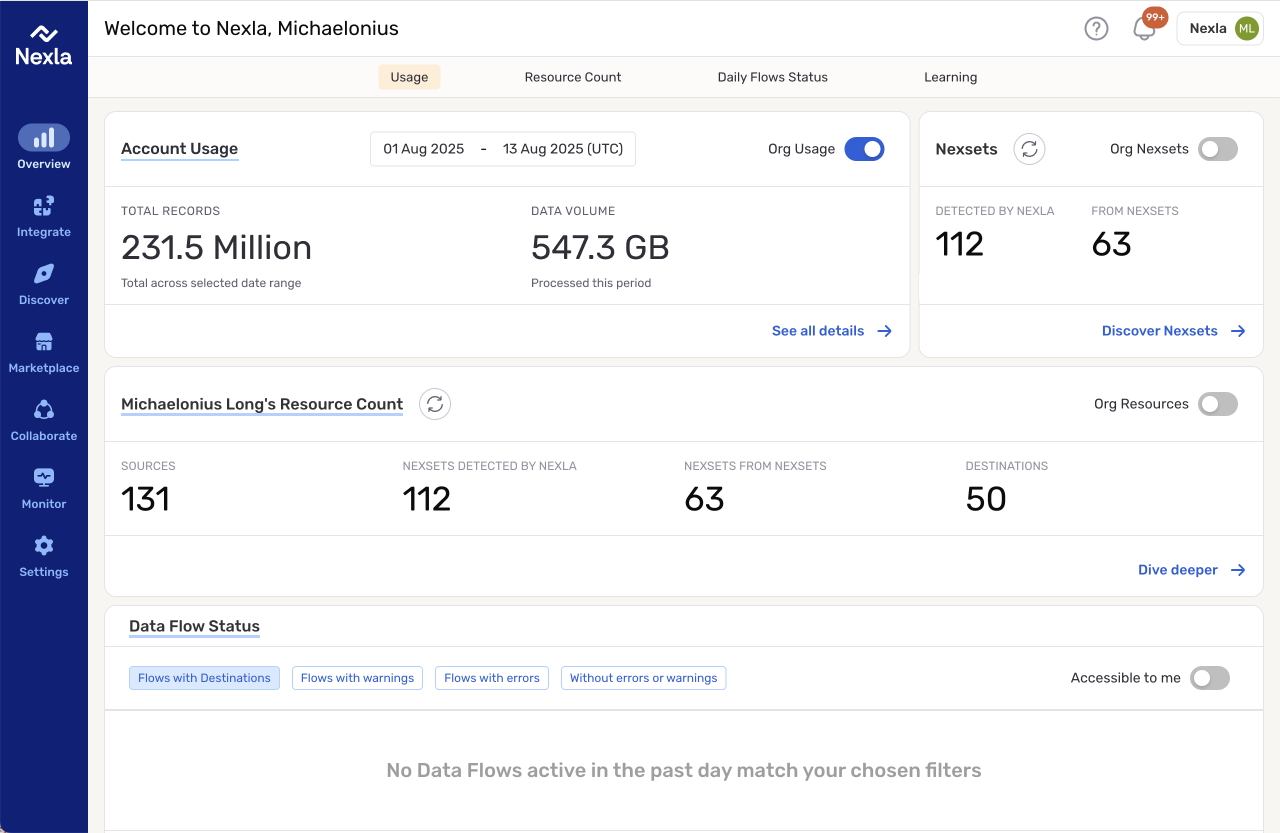
The team needed a redesign that could ship on top of the existing overview framework while leaving room for the dashboard to grow. The redesign had to make the current page easier to understand immediately while introducing navigation and structure that would still work once more overview sections and reporting surfaces were added.
We treated the page as an information architecture problem. One mode switch should set context for the whole dashboard. Sections should inherit that context instead of asking the user to re-decide it. The jump menu came from the same logic: if the overview was going to grow, users needed a way to move to a real section instead of scrolling through a long stack of cards.
A recording-backed product walkthrough surfaced three problems: there was no global mode switch, the page used a lot of space without adding much information, and every section taught the same context rule again. The walkthrough also clarified the scope line. Charts were not ready for deeper redesign, so the useful work was structure, navigation, and practical actions like CSV export.
The shipped dashboard sets org versus personal mode once, at the top of the page, then lets the modules inherit that choice. The jump-to control gives users a direct route to summary, read, write, and resource sections. Where reporting depth was outside the release scope, chart placeholder regions stayed visible and CSV export paths covered practical data extraction.
Scalable navigation: the Jump to Section menu makes future dashboard growth legible without falling back to repeated local controls.
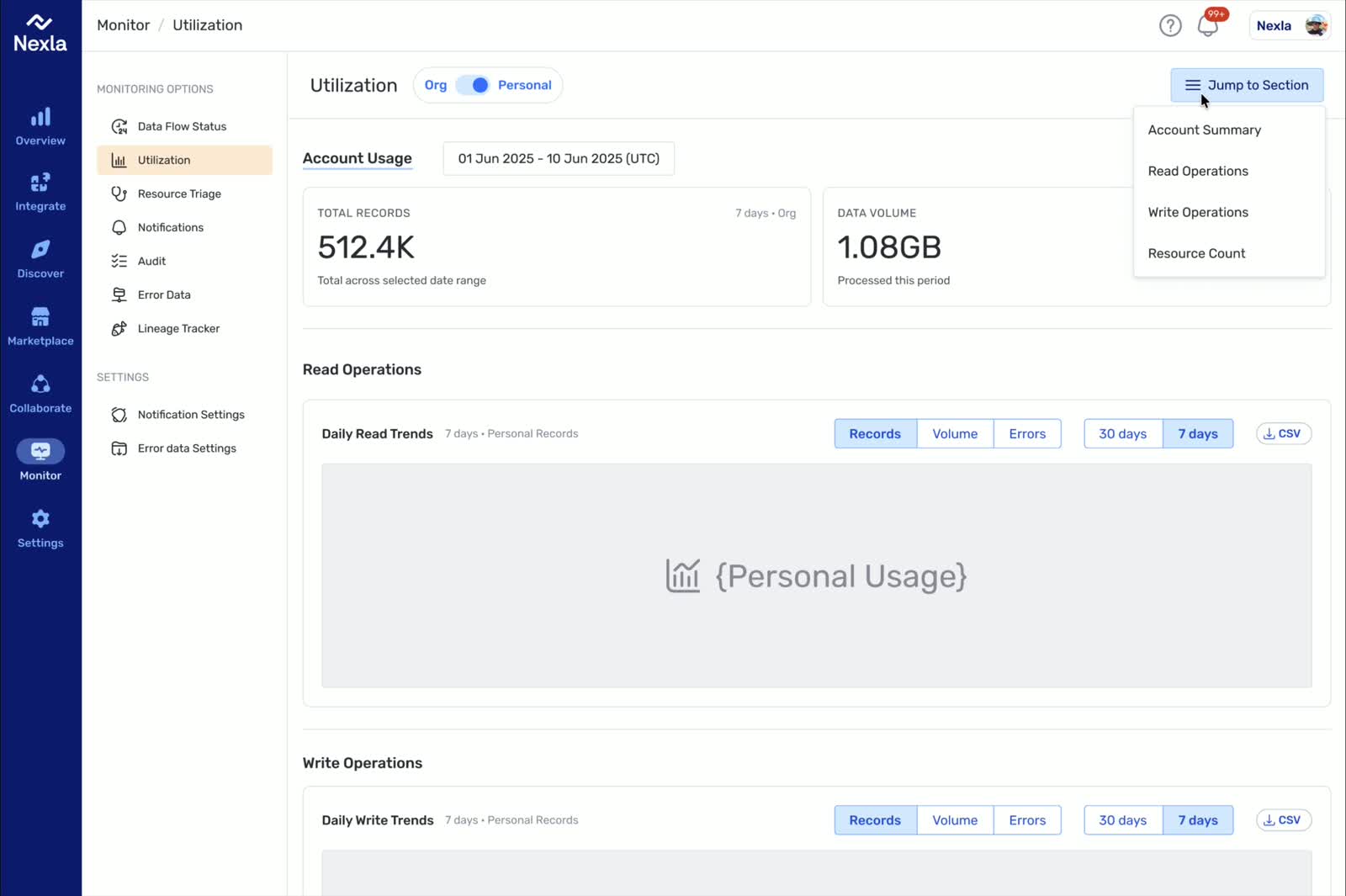
Design and engineering aligned around a narrow set of implementation decisions: centralize the page mode switch, improve wayfinding, preserve chart placeholder regions where redesign work had not happened, and add CSV downloads where operators would benefit from extracting data. The narrow scope kept the redesign useful and shippable while leaving chart and reporting follow-up visible.
Concrete destination: the Resource Count section shows how the new navigation model lands users in a specific part of the overview instead of leaving the page as one long undifferentiated stack.
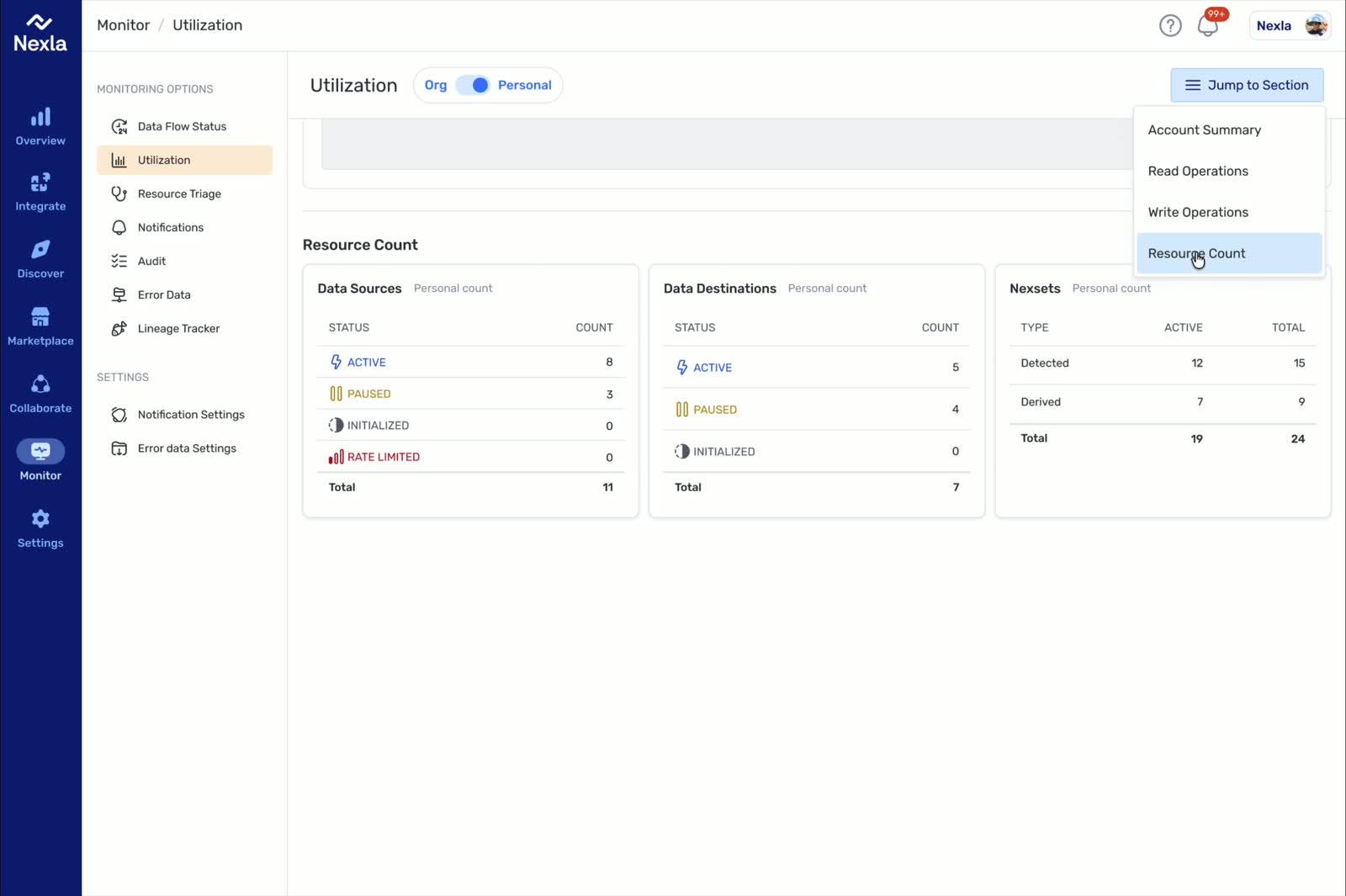
Delivered: the page-level mode, section navigation, CSV paths, and explicit chart scope shipped as a platform iteration.
After the redesign, the page read more like one dashboard instead of a collection of unrelated modules. Users could set context once, move through sections with a predictable menu, and export useful data without waiting for a larger analytics rewrite.
Validation plan: review whether users understand the global mode, whether the jump menu gets them to the right section, whether CSV actions are useful, and what chart behavior needs a deeper analytics pass.
The useful decision was sequencing dashboard structure before chart redesign. The page needed a better mode model and section order first. Once those were clear, the team could ship a better overview while tracking deeper chart and reporting behavior as follow-up work.
Moved flow creation from internal taxonomy to task-first setup while preserving backend contracts and role-based behavior.
The change was a sequencing cleanup: start with user intent, then expose flow-type specifics after the setup had enough context.
| Constraint | Design response |
|---|---|
| Backend contracts could not be rewritten in the same release. | Put the flow-type choice behind the task-first entry instead of making it the first decision. |
| Role and permission states still mattered. | Keep non-admin visibility while gating actions users could not execute. |
| QA and parallel PR capacity were limited. | Favor sequencing and CTA clarity over a broad onboarding rewrite. |
| Some metrics could not be backed by available APIs. | Cut weak metrics and document follow-up rather than filling the page with unsupported claims. |
We moved the flow creation entry toward the thing users understood: what they were trying to connect or set up. The old path asked them to pick from internal flow types too early. The new path started with task intent, then introduced flow-specific choices once users had setup context.
The product asked users to pick a flow type too early. Team conversations showed that users wanted to connect to systems first and only then handle flow-specific details. The mismatch caused confusion in onboarding and made the setup path feel brittle.
The platform supported multiple flow types with different backend and wizard behaviors. Some flow paths were still half-baked and exposed to users. The team needed to reduce user-facing complexity without hiding product power.
We iterated toward a task-first sequence: make the initial call to action map to user intent, then place the flow-type choice behind the first task setup. The process stayed deliberately incremental because backend contracts, parallel PRs, QA capacity, accessibility, and role-based actions all had to survive the change.
Weekly design, product, and engineering reviews kept circling the same issues: users did not know which flow type to choose, some metric ideas could not be backed by available APIs, and a few actions looked equally ready even when permissions or implementation state said otherwise. The repeated review pattern gave us a practical cleanup list instead of a broad onboarding rewrite.
The revised interaction model introduced clearer resource cards, simpler call-to-action mapping, and permission-aware actions. We preserved visibility for non-admin users while gating actions they could not execute.
Design and engineering reviewed edge cases in active/paused state semantics and reconciled API limitations with product language. We treated missing metrics as explicit scope cuts and documented follow-up work.
Delivered: the shipped iteration put task-first CTAs and resource-card setup ahead of flow-type selection, clarified card actions, and used disabled or gated states for permission-limited actions.
The cleaner sequence gave the team a base for later modal and dropdown creation patterns without blocking the current release.
Validation plan: measure setup drop-off, action completion, and permission-state clarity earlier, so the team is not relying only on review notes to decide where the flow is still confusing.
The lesson was sequencing. Users can usually answer the goal before they can answer the internal mode. Future work should collect setup and action-completion evidence earlier, so the team is not relying only on review notes to decide where the flow is still confusing.
Built a local memory tool that lets Codex, Claude Code, and other clients reuse project facts, preferences, owners, paths, and decisions across sessions.
agent-memory-mcp started as a practical fix for a recurring workflow problem: every local agent session could reason well in the moment, but useful project context kept fragmenting across tools and threads.
The behavior is simple: local AI tools can retrieve the same durable project context instead of asking the user to re-explain the repo every session.
agent-memory-mcp lets multiple local clients reuse scoped facts without forcing teams into a single editor, host app, or orchestration shell. The repo evidence is the save, find, merge, and update path backed by a local SQLite store.
| Before | Shared local memory | After |
|---|---|---|
| Context loss between Codex, Claude Code, and other local sessions. | Save durable facts with explicit scope: global, project, or session. | Retrieve project memory before acting instead of reteaching the same constraints. |
| Useful decisions stayed trapped in one thread. | Find related facts and merge duplicates through a shared local SQLite store. | Multiple clients can reuse repo facts, preferences, owners, paths, and decisions. |
| Agents repeated setup prompts. | Update durable facts when conventions or constraints become explicit. | Repeated work compounds across sessions while staying inspectable and local-first. |
The memory layer sits in the part of the workflow most agent tools currently skip over: project facts that outlast one session and can be reused across different local clients.
For the people actually using Codex, Claude Code, and similar tools day to day, the gap was not raw model quality. The real cost was reestablishing context every time they changed threads, tools, or tasks.

agent-memory-mcp turns repeated project context into something local agents can reuse instead of rebuilding it thread by thread.Repository: github.com/mikeylong/agent-memory-mcp
Turned successful AI workflow sessions into reusable `SKILL.md` packages with trigger rules, output contracts, workflow steps, edge cases, examples, and validation across Codex and Claude.
SkillSkill came from a familiar failure mode in AI-assisted work: one session would finally produce a strong workflow, but the next person still had to reteach the same job from scratch.
SkillSkill writes the parts of a SKILL.md an agent needs: when to use the skill, what to produce, how to work, which edge cases to handle, and examples to route against.
The package turns tacit workflow know-how into a reusable file with a clear trigger, contract, edge cases, validation checks, and a path into local Codex or Claude setups.
| Input | SkillSkill step | Output |
|---|---|---|
| Messy workflow notes or a successful one-off agent session. | Draft the trigger rules, output contract, workflow steps, edge cases, and example requests. | Generated SKILL.md that an agent can read and route against. |
| Draft skill package. | Check required files, short description quality, contract coverage, examples, metadata, and packaging drift. | Validation output that shows what is ready and what needs repair. |
| Repeated workflow across Codex or Claude. | Keep the core SKILL.md cross-tool, then add install scripts or mirrored packaging only when needed. | Reusable local skill instead of a longer prompt pasted into every session. |
Strong AI workflows rarely depend on the task statement alone. The useful part is usually the hidden discipline around what to include, what to exclude, how to structure the output, and how to handle messy inputs.
Tacit workflow knowledge is easy to discover in one good session and surprisingly hard to reuse afterward. Prompt snippets help, but they do not reliably tell an agent when a workflow should trigger, which files to read, what output to produce, or how to check the result.
SKILL.md files.SKILL.md around a routing description, binding contract, workflow steps, edge cases, and example requests.SKILL.md that agents can route to, follow, validate, and install.Repository: github.com/mikeylong/SkillSkill
Built a macOS menu bar utility that makes Codex rate-limit state plus 5h and Weekly usage pace visible at a glance, turning the next action into a one-click decision.
codex-toolbar is a small macOS menu bar utility for people who use Codex enough that rate limits become part of the working environment, not an occasional surprise.
The first version made the current limit state visible at a glance. The newer pass adds the more useful planning question: whether the current 5h and Weekly usage pace is likely to last through reset.
The shipped utility makes the constraints of daily Codex work visible enough to manage without leaving the current task.
| Visible signal | User decision |
|---|---|
| Most constrained window in the menu bar. | Keep working or check the popover before starting another task. |
| 5h and Weekly pace projection. | Decide whether current usage will last through reset. |
| Normal, warning, and critical states. | Continue, slow down, wait for reset, or jump back into Codex. |
Open Codex action. | Move from signal to work without hunting for the desktop app. |
Frequent Codex use creates a background coordination problem. You need to know whether you still have room in the current window, whether the tightest limit is about to reset, and whether today's pace is going to create a problem later in the week.
Codex Toolbar needed to run as an app, refresh reliably, and fit naturally into the menu bar habits of daily desktop use.
Popover states across the rate-limit curve
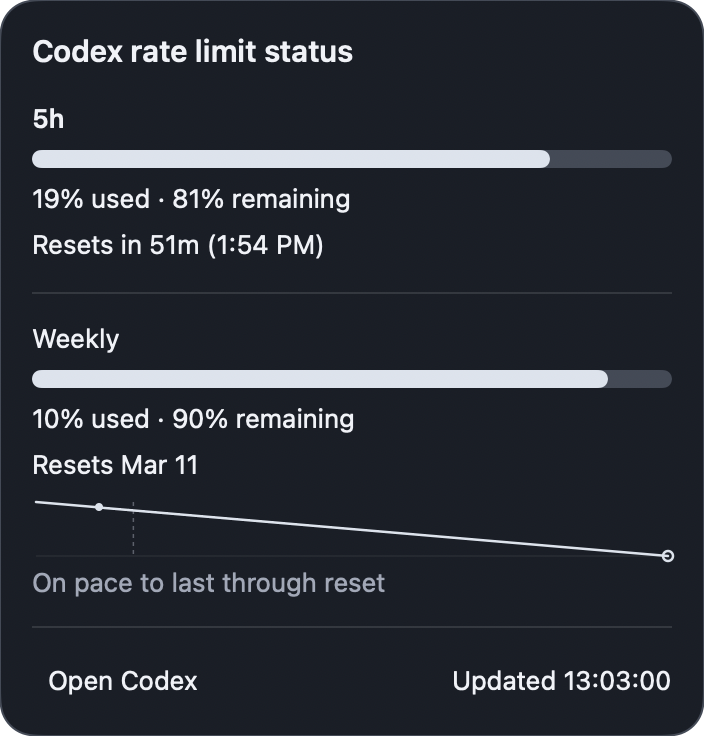
The popover needed to keep the pace chart visible while the rate-limit state changed, so normal, warning, and critical states stayed comparable without becoming visually noisy.
The charts make short and weekly limits planning surfaces. They compare the current point in each window, projected empty timing, and reset timing so the user can tell whether the limit is on pace to last or needs attention before reset.
Open Codex action when the desktop app is installed..app with launch-at-login support so it behaves like an everyday desktop utility instead of a dev-only helper.Open Codex action closes the loop from signal to action by pairing ambient status with a direct route back into the Codex desktop app.Repository: github.com/mikeylong/codex-toolbar
Website: codextoolbar.com